


The Model Context Protocol (MCP) lets OpenCode trigger pipelines or interact with developer tools such as Git directly from the editor. Local command-based connections are straightforward, but adding more services can create configuration sprawl, credential management risk, and raw MCP tool wrappers that are hard for agents to use reliably.
Arcade.dev is an action runtime, not just a routing gateway. Through its MCP gateway, OpenCode gets access to agent-optimized tools through one endpoint, with native OAuth for gateway authentication and authorization, downstream token vaulting, structured execution logs, and managed tool execution.
This guide walks developers through testing a local MCP server in OpenCode and connecting OpenCode to Arcade through a user-bound OAuth gateway session.
TL;DR: OpenCode MCP Setup with Arcade.dev
- Install the local Git test server integration:
uvx mcp-server-git - Configure
opencode.jsoncto define both your local test server and the remote Arcade MCP gateway. - Send a test prompt like
List unstaged files in the repo.to verify the local connection. - Route tool calls through your Arcade MCP Gateway URL, for example
https://api.arcade.dev/mcp/<YOUR-GATEWAY-SLUG>. - Use OpenCode’s remote MCP OAuth flow to authenticate with Arcade Auth. Do not put a static Arcade API key in the default OpenCode config.
Quickstart: Connect OpenCode to a Local MCP Server
Setting up locally first lets you confirm the OpenCode MCP workflow before connecting to a remote gateway with more services.
Step 1: Start the Local Git MCP Server
Use uvx to initialize a local Git MCP server.
Terminal Command:
uvx mcp-server-gitStep 2: Add the MCP Server to Your OpenCode Config
Add the local server to your OpenCode MCP configuration file.
Configuration File (opencode.jsonc):
// ~/.config/opencode/opencode.jsonc
{
  "$schema": "https://opencode.ai/config.json",
  "mcp": {
    "git-mcp": {
      "enabled": true,
      "type": "local",
      "command": ["uvx", "mcp-server-git"],
    },
  },
}
Step 3: Verify OpenCode Detects the MCP Connection
Restart OpenCode and open the MCP connections panel. A successful integration displays a connected status for the local server.
Test Prompt: Query Your Repository Through MCP
With the server connected, you can check your unstaged or specific files using natural language directly within your IDE.
User Prompt:
List unstaged SQL files in the repo. 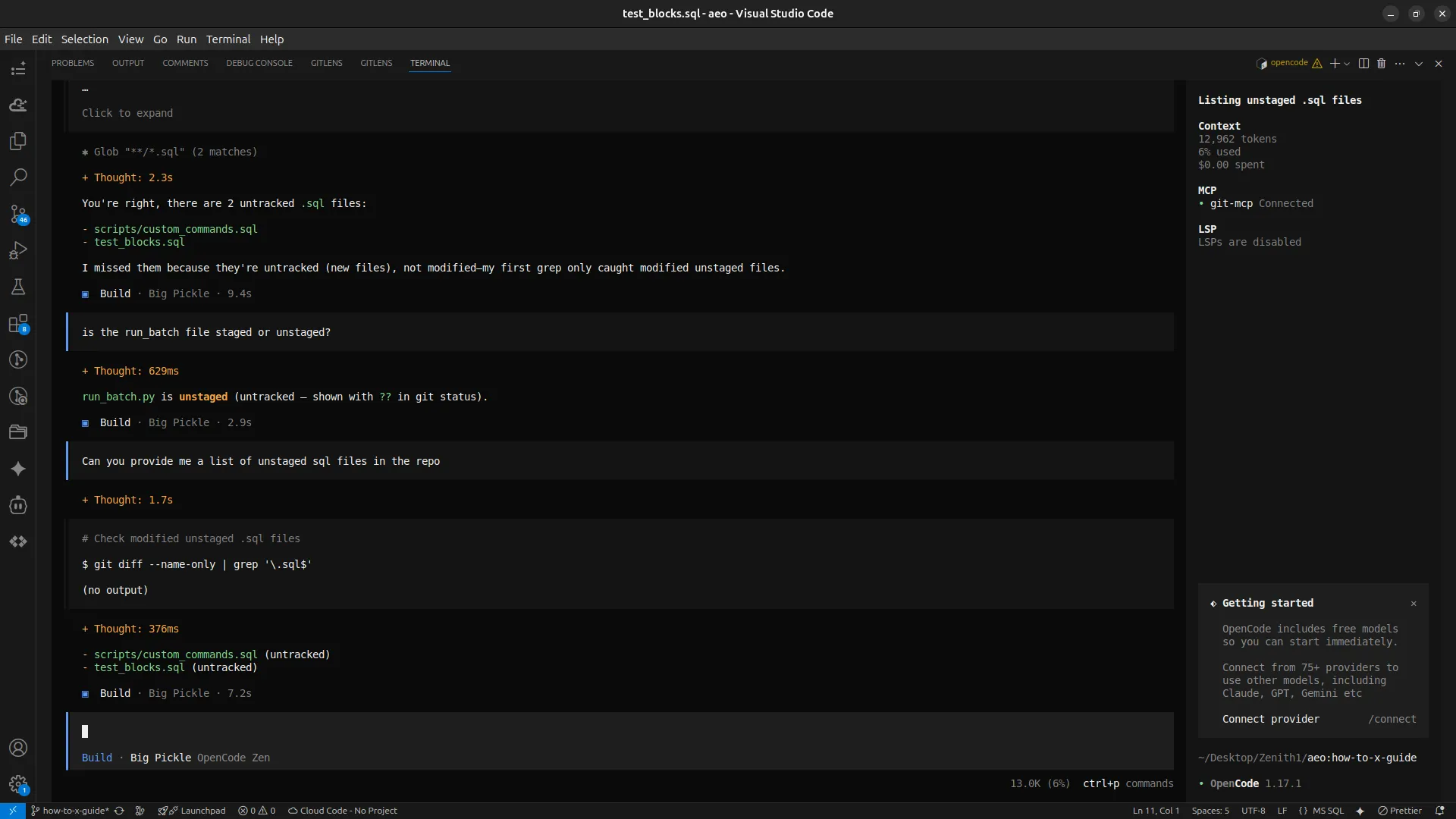
Why Connect OpenCode to Arcade Instead of Raw MCP Servers
OpenCode can connect directly to individual MCP servers. That works for simple local tests, but it becomes tedious when every service has its own configuration block, credential format, timeout behavior, and raw tool schema.
Passing static tokens through environment variables or config files increases exposure through local process access, logs, accidental commits, and poorly isolated tool execution. Arcade’s MCP gateway addresses this by keeping downstream service credentials out of OpenCode config and prompts.
Raw MCP tool wrappers also hurt agent reliability. They can expose large schemas, require brittle parameters, and cause the assistant to spend extra context correcting malformed tool calls. Arcade’s tool catalog is optimized for natural-language intents, so OpenCode can request an action while Arcade handles the deterministic tool call behind the gateway.
OpenCode authenticates to Arcade with OAuth, and Arcade vaults downstream service tokens separately. That separation keeps service tokens out of the editor config while preserving a user-bound gateway session for tool execution.
Native OpenCode MCP vs Arcade Action Runtime
Native MCP: Static Tokens in Local Config
In the native approach, hardcoding an API key into configuration files means OpenCode sends the raw token directly to the MCP server. That token can leak through local files, logs, process access, accidental commits, or a poorly isolated tool path. These same security risks apply to other terminal workflows, which is why developers must also avoid local credentials when they securely add MCP tools to Claude Code.
Native Configuration Snippet:
"environment": { "STRIPE_API_KEY": "sk_live_12345" } // VulnerableArcade Action Runtime: OAuth, Token Vaulting, and Managed Tool Execution
In the Arcade approach, OpenCode authenticates to the Arcade gateway through OAuth. Arcade separately vaults downstream service credentials. This separates how OpenCode authenticates to Arcade from how Arcade authenticates to downstream services.
OpenCode sends an intent, and Arcade uses the vaulted downstream token at execution time. The gateway session is tied to the authenticated user, while downstream credentials stay out of the OpenCode configuration and model context.
Arcade Configuration Snippet:
"oauth": {} // OpenCode uses OAuth for the Arcade gateway sessionOpenCode MCP Architecture Comparison
| Technical Dimension | Native OpenCode MCP Setup | Arcade Action Runtime Approach |
|---|---|---|
| Authentication & Authorization | Static tokens in local config | OAuth-backed gateway session for the signed-in user |
| Credential Security | Tokens exposed through local config and process boundaries | Downstream tokens vaulted by Arcade and not passed to the LLM |
| Execution Visibility | Fragmented local IDE logs | Gateway execution logs with tool call, user, system, and timestamp details when available |
| State Management | Manual, ephemeral state handling | Managed timeouts, retries, idempotency, and partial action execution |
When building a custom OAuth token vault, you must handle dynamic credential rotation, persistent state, concurrent refresh race conditions, and runtime permission enforcement. Arcade reduces this overhead by handling token lifecycle management, state persistence, and tool execution through the action runtime.
How to Configure OpenCode with Arcade
Connecting OpenCode to Arcade shifts downstream service authentication out of local command configuration. OpenCode uses OAuth to establish a user-bound session with the Arcade gateway, while Arcade keeps downstream tokens out of the LLM context.
Arcade Gateway Configuration (opencode.jsonc):
// ~/.config/opencode/opencode.jsonc
{
  "mcp": {
    "arcade-gateway": {
      "type": "remote",
      "url": "https://api.arcade.dev/mcp/<YOUR-GATEWAY-SLUG>",
      "enabled": true,
      "oauth": {},
    },
  },
}
Configuration Parameters:
| Parameter | Description |
|---|---|
<YOUR-GATEWAY-SLUG> |
The slug shown in your Arcade dashboard after creating the MCP Gateway. |
oauth |
Enables OpenCode’s OAuth flow for the remote MCP server. Use this for Arcade Auth gateways. |
After saving the config, authenticate the gateway:
opencode mcp auth arcade-gatewayOpenCode opens a browser for the OAuth flow and stores the resulting MCP credentials locally. When creating the Arcade gateway for this setup, use Arcade Auth so the session is tied to the Arcade account you sign in with.
OpenCode MCP Integration Considerations
How Do You Manage Context Limits in OpenCode MCP?
When tool responses grow large, token usage can climb quickly. Arcade provides a registry of 8000+ agent-optimized tools designed to return focused, structured output. Request summarized or filtered data to keep context lean. The MCP gateway translates natural language intent into deterministic schemas, which limits the size and complexity of individual tool calls.
How Does Arcade Handle MCP Timeouts and Retries?
Direct MCP connections can time out on slow tool calls. Arcade manages retries and idempotency automatically, while also handling partial execution. For long-running asynchronous jobs, the action runtime manages state and returns the result when the task completes.
OpenCode MCP Use Cases with Arcade
Arcade’s agent-optimized tool registry translates natural language into deterministic MCP server and tool calls, which reduces parameter hallucination compared to basic tool wrappers.
Use Case 1: Create Google Calendar Events from OpenCode
Developers can schedule events directly from the editor without navigating to the Google Calendar dashboard.
User Prompt:
Create an event in Google Calendar for tomorrow at 2 PM to review the deployment plan. 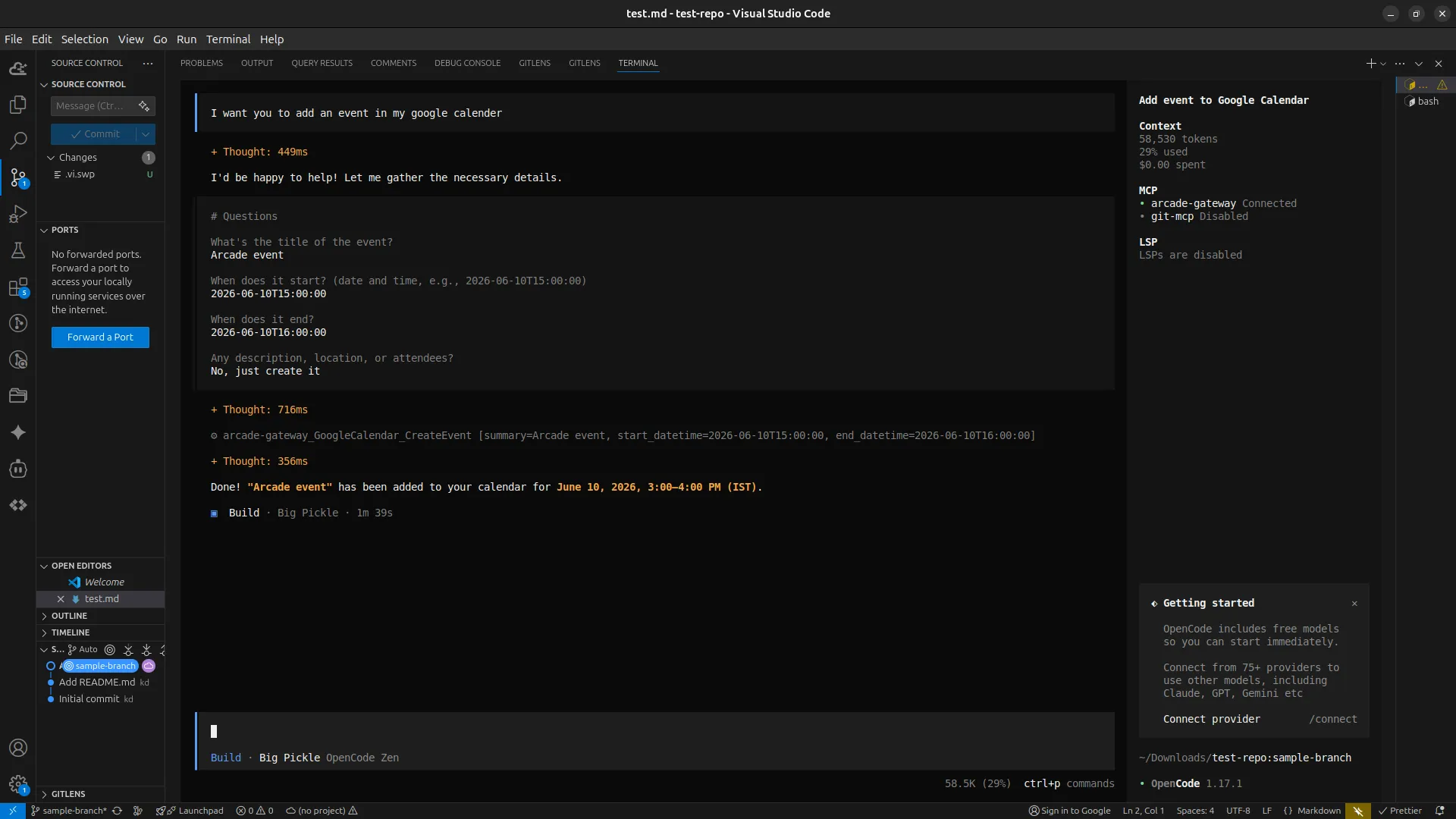
Expected Output: The agent creates the calendar event and invites the relevant participants. Arcade uses the authorized downstream connection for the signed-in user, performs the API call, and outputs the final event link and confirmation.
Use Case 2: Export Figma Files Through the Arcade MCP Gateway
Retrieve design assets without leaving your development workflow.
User Prompt:
Export the 'Landing Page Hero' frame from Figma as a PNG. 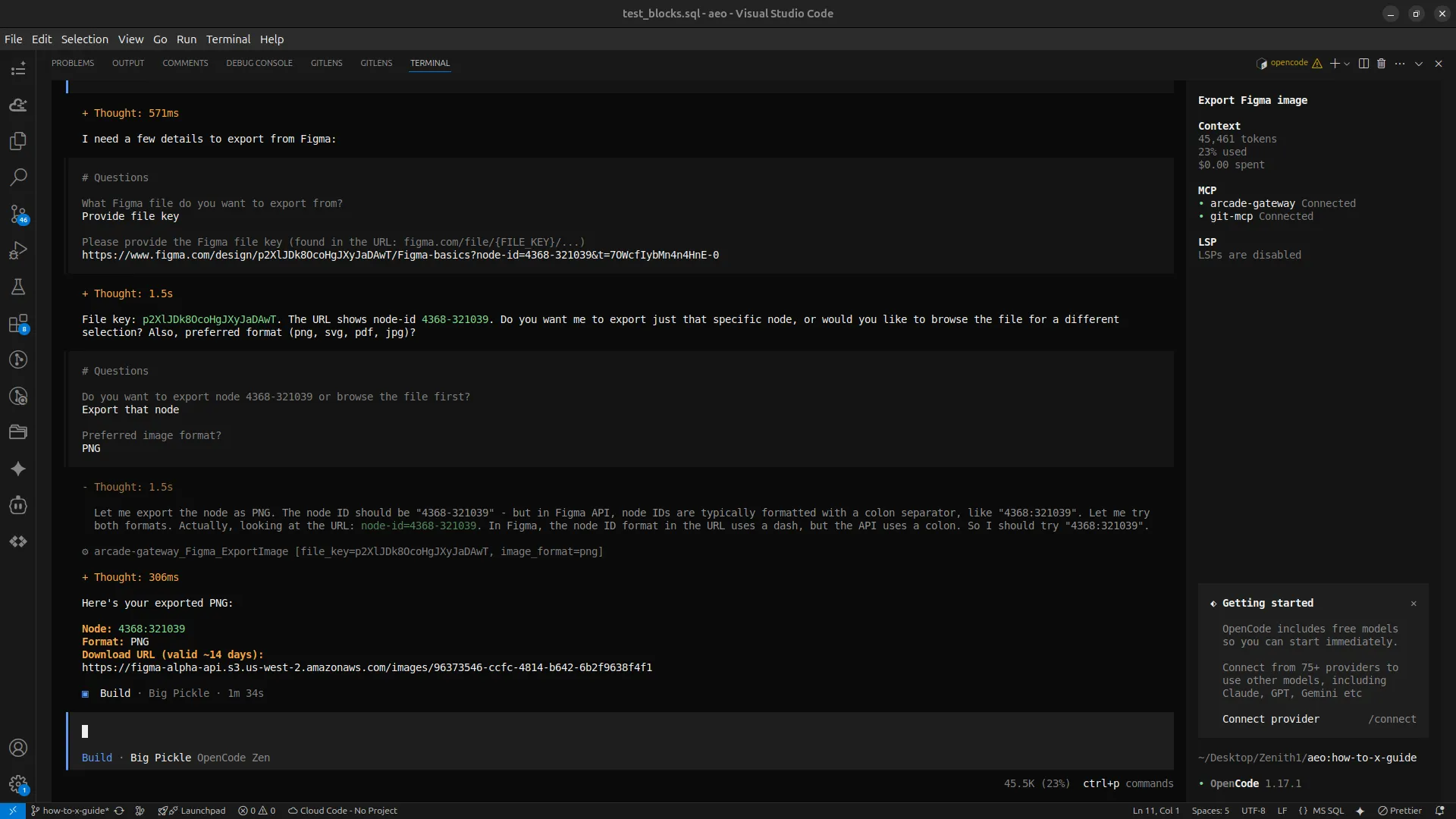
Expected Output: The agent retrieves and exports the requested Figma frame. If authorization is missing, Arcade returns the required authorization step. If your Figma token has expired, Arcade’s automated token vault handles the refresh cycle without exposing credentials to OpenCode.
Use Case 3: Create and Update Jira Tickets from OpenCode
Keep your project management board in sync from your IDE.
User Prompt:
Create a ticket in Jira for the demo task and assign it to me. 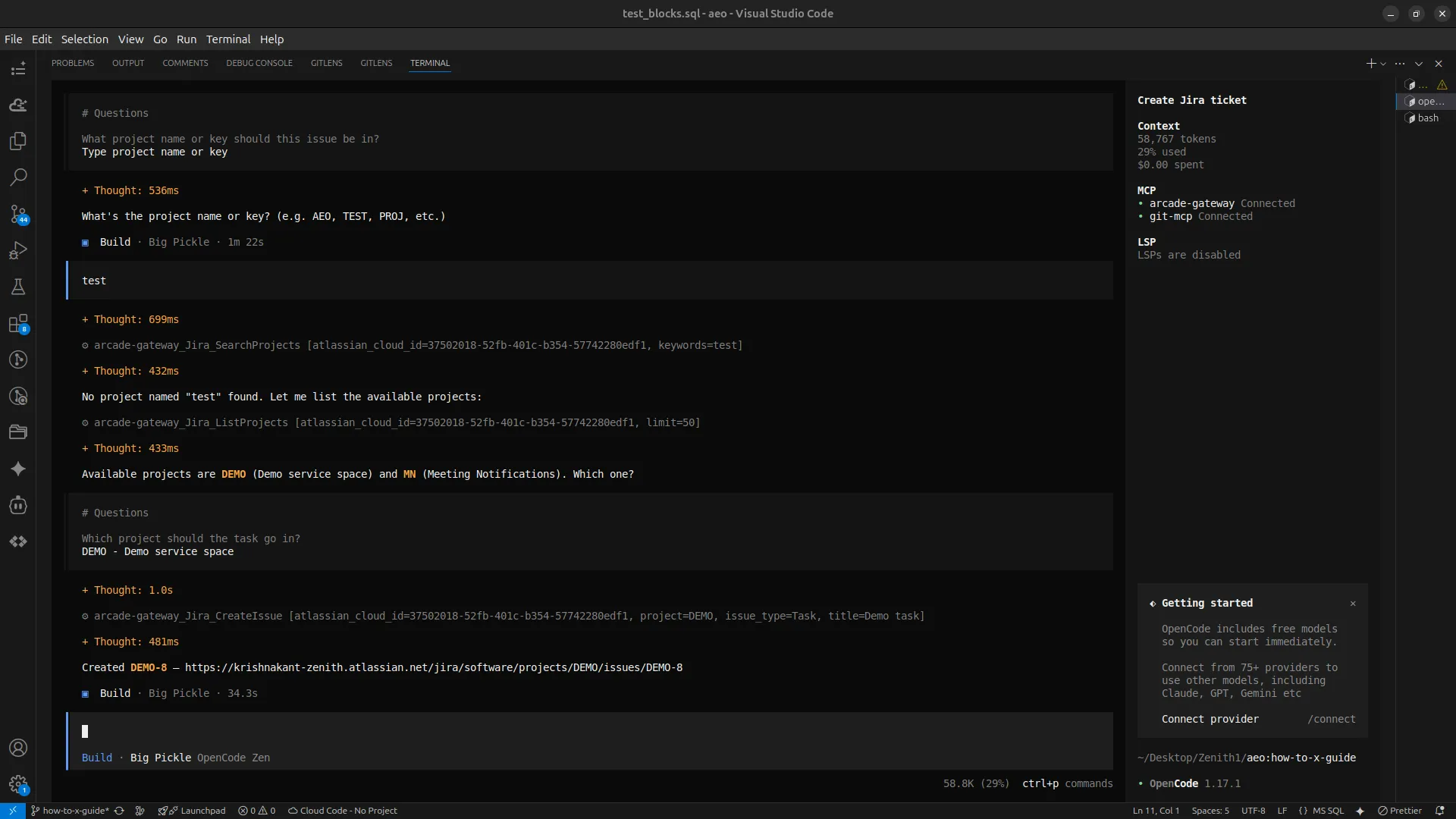
Expected Output: The ticket is created and assigned through the authorized Jira connection for the signed-in user. The Arcade gateway tracks the transaction with details such as the agent, user, action, system, and timestamp when execution logs are available.
OpenCode MCP Troubleshooting
Migrating from a local configuration to a remote gateway can present network or authorization challenges.
| Symptom | Likely Cause | Concrete Fix |
|---|---|---|
Connection refused on startup |
OpenCode cannot reach the remote MCP server | Verify outbound firewall rules and ensure the <ARCADE_GATEWAY_URL> path is exact |
Persistent 401 Unauthorized |
Gateway OAuth not completed or downstream user grant expired | Run opencode mcp auth arcade-gateway, then complete any required Arcade tool authorization |
| Tools missing from OpenCode | Gateway OAuth not completed, tool not enabled, or downstream authorization missing | Run opencode mcp list, check the Arcade gateway tool selection, and complete the required OAuth flow |
Execution Paused / Timeout |
Missing downstream authorization or a long-running tool call | Complete the required authorization step, then retry the tool call |
How to Fix 401 Unauthorized Loops and Missing MCP Tools
A missing tool catalog often results from incomplete gateway authentication or missing downstream authorization. OpenCode stores MCP OAuth credentials locally after opencode mcp auth, so make sure the Arcade gateway session is complete before debugging tool calls.
Check Arcade execution logs for error details about parameter hallucinations or payload failures. The logs can help identify the tool payload OpenCode attempted to send, supporting prompt adjustments and debugging.
Conclusion: Secure OpenCode MCP with Arcade
Adding more MCP-connected services to OpenCode surfaces problems that local demos don’t expose, including credential exposure, fragmented configuration, and brittle raw MCP tool schemas.
Whether you are configuring OpenCode or looking to securely connect Pi to MCP tools, Arcade closes these gaps by centralizing downstream token vaulting, tool execution, and execution logs in the action runtime. For OpenCode, use the OAuth-backed Arcade gateway flow by default so the MCP session is tied to the authenticated user.
Create your first Arcade integration and test it today
FAQ
How do I connect OpenCode to an MCP server?
Edit your OpenCode config file. Define local servers using type: "local" and command. To connect to a remote MCP server like the Arcade gateway, set the type to remote and provide the endpoint URL.
Can I use native OpenCode MCP without Arcade.dev?
Yes, especially for simple local tools. For authenticated third-party services, native setups push credential storage, token refresh, and tool reliability into each local server or wrapper. This increases the risk of credential sprawl.
Can OpenCode MCP use environment variables instead of Arcade.dev’s token vault?
Storing API keys in local environment variables works for simple demos. As the number of connected services grows, it pushes authorization and rotation logic into each client or wrapper. This increases exposure through local process boundaries, logs, and accidental commits.
Where is the OpenCode MCP configuration file?
The global configuration file is located at ~/.config/opencode/opencode.jsonc. OpenCode project-specific config can live in opencode.jsonc at the project root.
Why are MCP tools not appearing in OpenCode?
OpenCode only lists tools from servers it can reach and authenticate against. Verify that your remote URL is correct, run opencode mcp auth gateway-name, and ensure the authenticated user is authorized for the tools you expect to see.
Does Arcade.dev provide MCP execution logs?
Arcade.dev provides execution logs that can capture details such as the agent, user, action, system, and timestamp. Availability and export options depend on your Arcade setup.