


Pi ships without MCP support by design. Its core toolset is just read, write, edit, and bash. Connecting it to Slack, Jira, or any external service means adding an extension first, and a naive setup puts an API key straight into a plain-text config file.
This guide connects Pi to Arcade.dev instead, so tool calls run through your own OAuth session rather than a static key anyone with file access could read. By the end, you’ll have three working prompts: filing a Jira ticket from a Slack alert, building a morning briefing from email and calendar, and turning Linear issues into a status report.
TL;DR:
- Pi doesn’t include MCP support or credential handling natively, so a hardcoded API key would sit inside every prompt Pi processes.
- Arcade.dev closes that gap as a remote actions runtime that keeps credentials out of the LLM’s context entirely.
- Arcade authorizes each tool call at execution time through your own OAuth session, instead of relying on a static, broadly scoped token sitting in a local file.
- Three ready-to-run workflows: creating a Jira ticket from a Slack alert, turning unread emails and today’s calendar into a morning briefing, and turning your assigned Linear issues into a status report.
Quick Summary: Setting Up Arcade.dev with Pi
- Install a Pi MCP extension, since Pi doesn’t ship with MCP support built in. For example,
pi install npm:pi-mcp-extension. - Install the Arcade CLI and authenticate with
uv tool install arcade-mcp,thenarcade login. - Configure
~/.pi/agent/mcp.jsonwith your Arcade Gateway URL so Pi can reach it. - Authorize each connected account (Slack, Jira, GitHub, and so on) through the browser consent screen Arcade opens the first time a tool needs it. There’s no session token to inject yourself.
- Verify the connection from inside a Pi session. For example, with the
/mcpcommand your extension provides. - Run secure tools using natural language without managing local credentials.
- Get persistent memory, execution-time authorization, hosted tools, and a log of every action, all automatically, without setting any of it up yourself.
What Is Arcade.dev, and Why Does Pi Need an Action Runtime?
The Problem with Local MCP Tool Execution
Connecting Pi locally is straightforward. Doing it securely takes more care. Moving from prototyping to real-world actions exposes a real risk. A single leaked token can expose everything it touches. Raw API wrappers also pollute your context, and there’s no persistent memory of what happened. Arcade is the remote actions runtime that closes these gaps. This guide is for anyone using Pi who wants to connect real tools and accounts securely, without pasting raw API keys into a local config file.
Pi doesn’t include MCP support out of the box. To use MCP servers at all, you first install a community MCP extension for Pi, for example, pi install npm:pi-mcp-extension, then point it at Arcade instead of hardcoding tokens for each individual tool. Model Context Protocol (MCP) standardizes how agents discover, authenticate, and invoke tools securely across any client. Shifting tool execution from the local client to a remote MCP actions runtime keeps your credentials out of Pi’s context entirely.
How Arcade.dev Closes the Security Gap
Arcade handles persistent memory, authentication and authorization for each account you connect, hosted tool execution, and reliable execution automatically. You can securely trigger authenticated actions directly from the terminal without exposing your underlying credentials to the model. Each account you connect (Slack, Jira, GitHub, and so on) is authorized through a standard OAuth consent flow, and Arcade vaults the resulting token on its side. This uses zero-trust execution, where credentials stay delegated rather than exposed.
How to Connect Pi to Arcade.dev (Quickstart)
To securely connect Pi to Arcade without exposing local API keys, configure the remote actions runtime to handle tool authentication and authorization. This approach moves credential management out of the local client and requests your consent via OAuth at execution time.
Step 1: Install the Pi MCP Extension and Arcade CLI
Pi needs an MCP extension before it can talk to any MCP server, plus the Arcade CLI to manage your session.
pi install npm:pi-mcp-extension
uv tool install arcade-mcp
arcade login
Step 2: Configure Pi
Point your Pi agent to the remote actions runtime by adding this minimal configuration.
// ~/.pi/agent/mcp.json
{
  "mcpServers": {
    "arcade": {
      "transport": "streamable-http",
      "url": "https://api.arcade.dev/v1/mcps/arcade-mcp",
      "lifecycle": "eager",
      "auth": {
        "type": "oauth"
      }
    }
  }
}
Step 3: Verify the Connection
Check the status of the connection from inside a Pi session.
/reload/mcp
/mcp:auth arcade
The extension marks the server as connected once it can reach the arcade server.
Investigate a Datadog Alert and File a Jira Ticket
With the remote actions runtime connected, you can execute real actions securely, right from your first prompt. Pass the following prompt to Pi:
Check Datadog for any critical alerts firing in the last hour. If there's one for the payments service, create a Jira bug ticket in the PLATFORM project with the alert details and assign it to me.Pi dynamically prompts you for an OAuth login the first time it needs Datadog or Jira access, and Arcade only ever requests the permissions that the tool call needs. The agent reads the alert and creates the ticket strictly on your behalf via delegated execution. Not a single static token ever touches your local configuration.
This is zero-trust execution. It structurally eliminates prompt injection by keeping credentials completely out of the LLM.
Why a Local Pi MCP Setup Puts Your Own Credentials at Risk
Running native Pi wrappers against local configuration files introduces real risk once you’re connecting real accounts, not just experimenting.
The Risk of Local Token Injection
The most critical gap is what a single leaked token can reach. Storing a persistent token in a local file usually means one broadly scoped personal access key, not something scoped to a single action. If that file leaks, whoever has it can act as you across everything that token can touch.
Passing raw API schemas directly to the LLM causes context pollution. This saturates token limits and degrades the model’s reasoning, planning, generation, and action capabilities. Local terminal sessions also suffer from ephemeral state. There is no persistent memory or record of what the agent actually did.
Pi Local Tokens vs. the Arcade.dev Action Runtime
In a Native Pi setup, you inject static secrets directly into the environment, which exposes them to the agent:
// Native: High-risk local credential exposure
{
  "API_TOKEN": "sk_highly_privileged_static_key"
}
With Arcade, there’s no static secret to inject at all. You authorize once through OAuth, and Arcade brokers every execution remotely, returning only the result:
// Arcade: Secure OAuth session delegation
{
  "auth": {
    "type": "oauth"
  }
}
Building this kind of protection yourself would take real engineering effort. You’d have to create OAuth flows, token refresh, and structured logging, at minimum. Arcade gives you that layer already built, so you don’t have to.
| Architectural dimension | Native Pi approach | Arcade approach |
|---|---|---|
| Token management | Static API keys stored locally in configuration files | OAuth tokens vaulted remotely by Arcade, never stored in your Pi config |
| Execution risk | High; LLM has access to underlying credentials | Mitigated; zero-trust execution keeps credentials outside the LLM context |
| Tool precision | Raw API wrappers (causes hallucinations/token bloat) | +8,000 agent-optimized tools designed for intent and determinism |
| Audit & memory | Ephemeral state; blind local execution | Persistent memory with a full log of every action taken |
How to Configure Arcade.dev for Your Own Pi Setup
To set this up for yourself, add this configuration to your global ~/.pi/agent/mcp.json file, or as a project-level override in .pi/mcp.json. The mcpServers key defines where the remote integration lives.
// ~/.pi/agent/mcp.json
{
  "mcpServers": {
    "arcade": {
      "transport": "streamable-http",
      "url": "https://api.arcade.dev/v1/mcps/arcade-mcp",
      "lifecycle": "eager",
      "auth": {
        "type": "oauth"
      },
      "env": {
        "ARCADE_TIMEOUT_MS": "<PLACEHOLDER_TIMEOUT_VALUE>"
      }
    }
  }
}
Configuration Parameters Reference
| Parameter | Description |
|---|---|
transport |
Must be set to streamable-http to stream the MCP protocol over remote HTTPS. |
url |
The primary Arcade remote actions runtime endpoint. |
lifecycle |
eager instructs Pi to establish the session connection immediately upon startup. |
auth.type |
Set to oauth so Pi opens a browser consent screen and Arcade vaults the resulting token on its side; no static credential lives in this file. |
ARCADE_TIMEOUT_MS |
Defines the cutoff threshold for long-running remote tool executions. |
Authorizing Accounts Without Hardcoded Tokens
There’s no <PLACEHOLDER_TOKEN> to manage here, and nothing to remember to keep out of source control. The first time Pi calls an Arcade tool that needs a specific account, Arcade opens a browser window so you can sign in and grant scoped permissions for that account. Arcade stores the resulting OAuth token in its own vault, and refreshes it automatically as needed. Your mcp.json file stays safe to keep in a dotfiles repo, since it only ever points at the Arcade endpoint and never contains a credential.
Common Gotchas
Running Pi in non-interactive mode (using pi -p) launches a fresh subprocess. Since Arcade authorizes through OAuth rather than a static credential, the very first call in a fresh non-interactive session may still need a one-time interactive login to complete the browser consent step before it can proceed. If a tool call in a non-interactive session appears to hang on authorization, run Pi interactively once to finish the OAuth flow. After that, the vaulted session is reused automatically for both interactive and non-interactive runs.
3 Pi and Arcade.dev Workflows You Can Try Today
Remote actions runtimes transform native AI clients into secure, cross-platform automation engines. The following workflows demonstrate agent-optimized tools executing entirely within Pi, each one using no more than two connected apps.
Create a Jira Ticket from a Slack Alert
Bridging communication platforms with project management often requires exposing sensitive read/write scopes. With Arcade managing execution-time authorization and per-tool permission enforcement, you can safely pull data from one system and write to another.
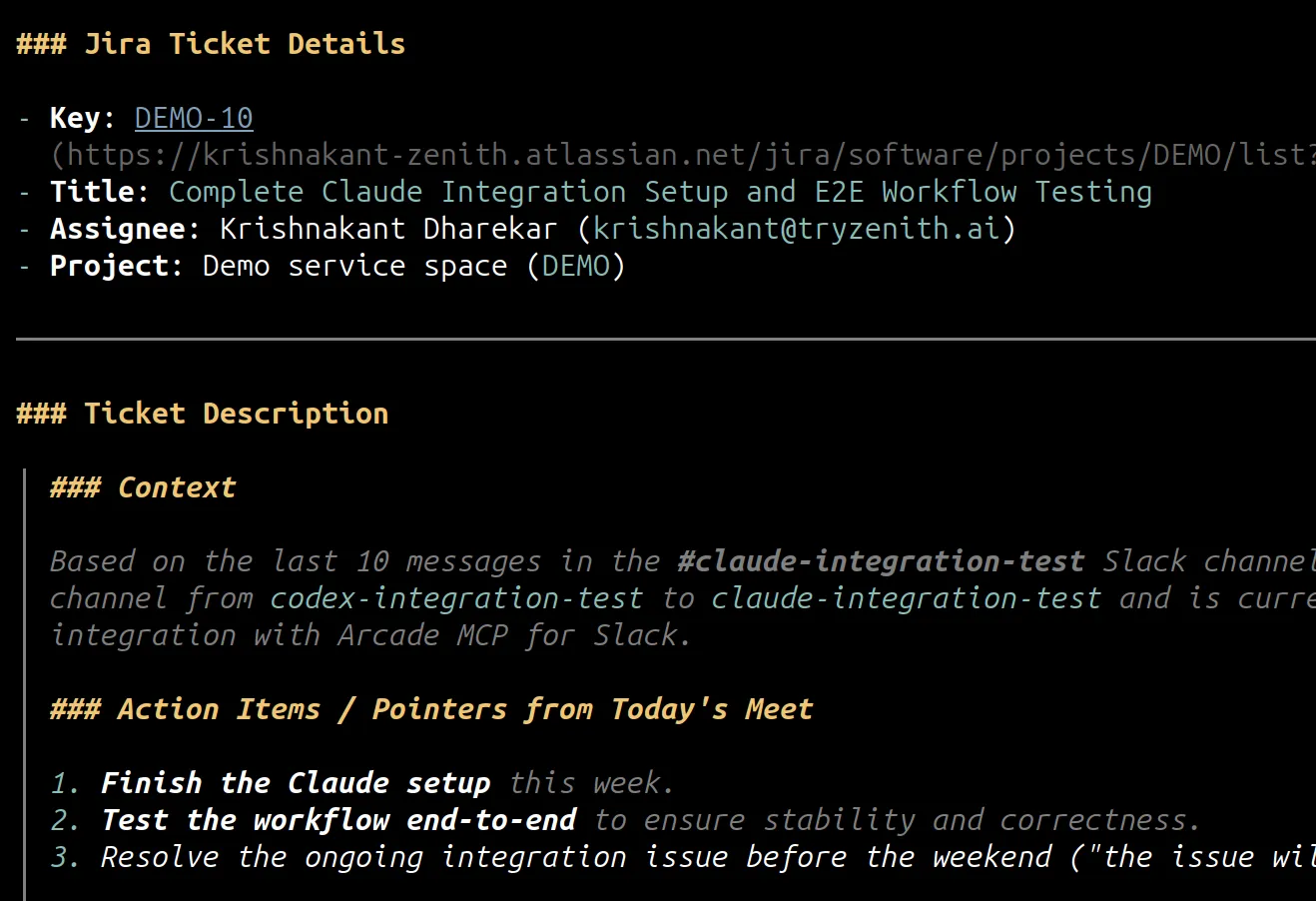
Read the last 10 messages in the #claude-integration-test Slack channel. Create a properly formatted Jira bug ticket, assigning it to me.Expected output: Pi delegates the intent to the remote actions runtime, which evaluates your Slack and Jira permissions, reads the channel, and outputs a confirmation link to the newly created Jira ticket.
Turn Unread Emails and Today’s Calendar into a Morning Briefing
Starting the day by tabbing between your inbox and your calendar wastes the first ten minutes before you’ve written a line of code. This workflow reads both and hands you the short version.
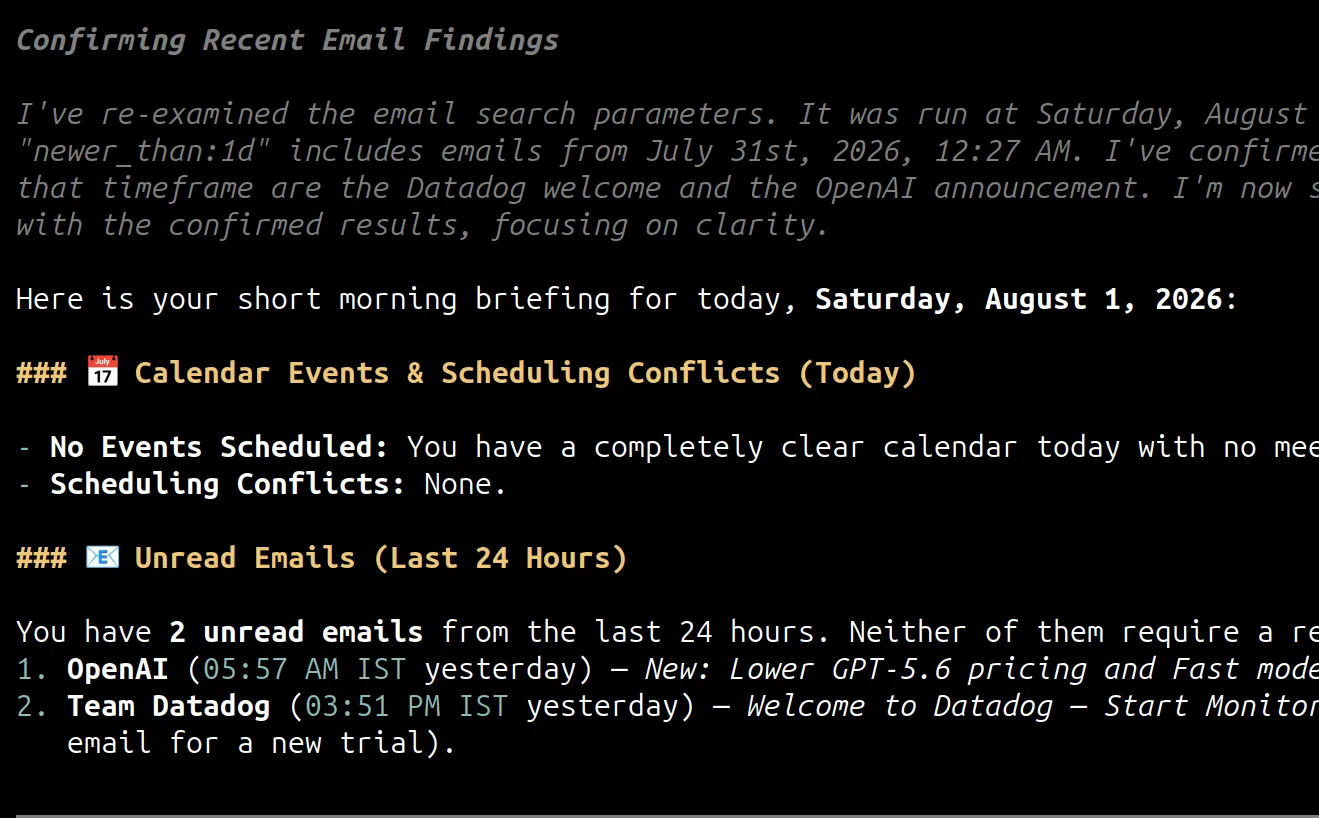
Check my unread emails from the last 24 hours and my calendar events for today. Give me a short morning briefing: anything that needs a reply before my first meeting, and any scheduling conflicts.Expected output: Pi reads unread messages from Gmail and today’s events from Google Calendar, cross-references the timing, and returns a short, prioritized briefing directly in the terminal.
Turn Your Linear Issues into a Weekly Status Report
Writing a weekly status update is a chore that mostly involves restating work you already tracked somewhere else. This workflow pulls that context straight from Linear.
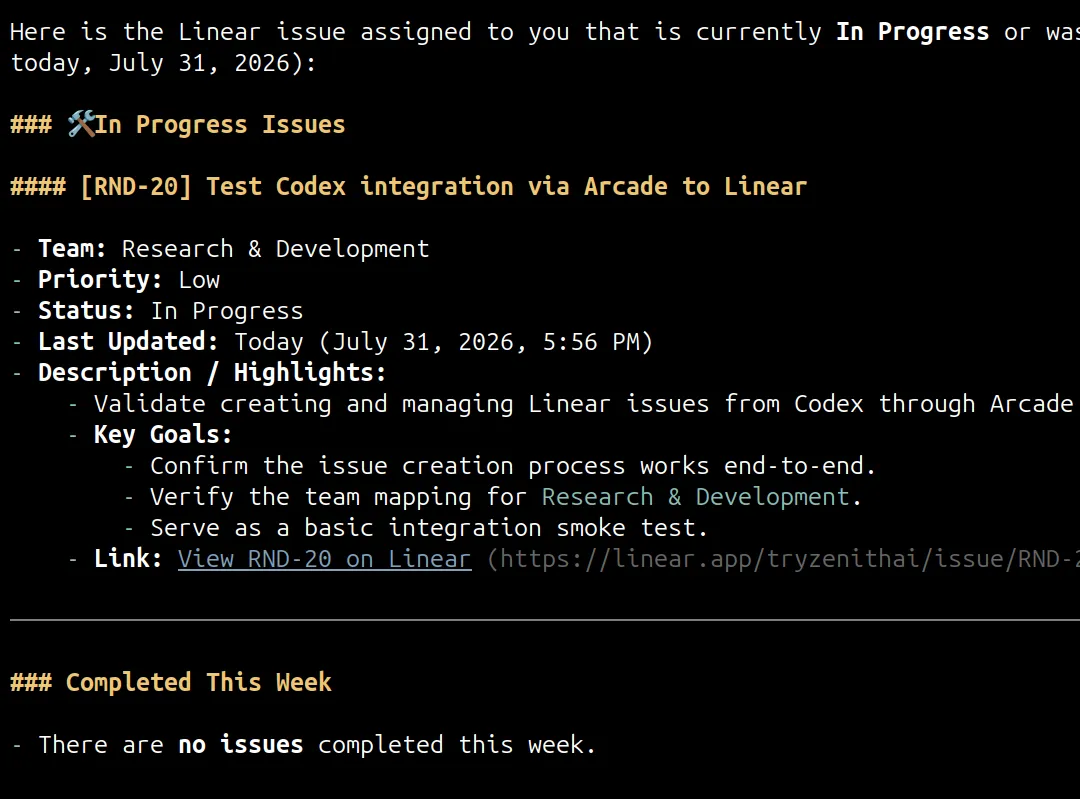
List every Linear issue currently assigned to me that's in progress or was completed this week. Summarize the highlights.Expected output: Pi reads your assigned issues from Linear, groups them by status, and creates a readable summary.
How to Troubleshoot Pi MCP Server Connections
Connecting Pi to remote MCP infrastructure may surface specific integration failures. Use this diagnostic matrix to resolve them.
Common Connection Errors and Fixes
| Symptom | Likely Cause | Concrete Fix |
|---|---|---|
mcp connection refused |
Local firewall blocking outbound remote MCP traffic | Ensure outbound port 443 is open for the url endpoint in your network settings. |
Repeated 401 Unauthorized |
Expired or revoked OAuth session for a connected account | Re-run arcade login, or re-authorize the specific account with /mcp:auth arcade from inside Pi. |
| Tool hallucinating parameters | Pi attempting to use raw API wrappers | Verify your configuration points exclusively to Arcade and not a basic API proxy. |
| Actions failing silently | Insufficient Just-in-Time (JIT) user scopes | Review the execution payload in the Arcade remote actions runtime logs. |
Handling the 401 Unauthorized Loop
The standard MCP auth specification manages permissions dynamically. When a tool lacks scopes, Arcade returns a structured INSUFFICIENT_SCOPE error with a remediation URL. Pi surfaces this as a “Re-authorize” prompt. Follow the link to complete the OAuth consent screen again and refresh your token cache without restarting the CLI.
Diagnosing Silent Failures
The intersection rule applies: Agent Permissions ∩ User Permissions = Effective Action Scope. If tools execute but expected downstream effects don’t happen, your OAuth session likely lacks write permissions for that account.
Check the definitive execution traces in your Arcade dashboard. The audit logs clearly flag denied scope requests and boundary failures.
Conclusion: Securing Your Pi AI Integration
Moving from a quick local script to something you trust with your real accounts means shifting from static credentials to dynamic, remote execution. Arcade is the remote actions runtime that makes that shift straightforward.
Integrating AI assistants like Pi or GitHub Copilot with an Arcade remote actions runtime provides:
- Persistent memory
- Managed OAuth-based authentication and authorization
- Hosted tool execution
- Reliable execution
- A log of every action it takes on your behalf, enforced automatically rather than just recorded after the fact
This means you don’t have to build any of this yourself, and you can start trusting your agent with real accounts instead of toy demos.
Create your first Arcade.dev integration and test it today.
Frequently Asked Questions
How do I connect Pi to a remote actions runtime securely?
Install a Pi MCP extension, install and authenticate the Arcade CLI with arcade-mcp and arcade login, and configure mcpServers in your Pi mcp.json to point to the Arcade endpoint with auth.type set to oauth.
Can I use native local API keys in Pi instead of Arcade.dev?
Yes, but this isn’t a great habit even for your own local setup. Hardcoding static API keys in local config files exposes your most sensitive credentials to prompt injection and leaves you no record of what happened.
Can I use a basic open-source MCP proxy instead of Arcade.dev?
You can, but basic proxies merely pass traffic without dynamically managing authentication and authorization for you. This requires you to manually build and maintain state management, per-tool permission enforcement, and reliable agent-optimized tools.
Where is the Pi MCP configuration file located?
The global configuration is located at ~/.pi/agent/mcp.json, and project-level overrides can be placed in .pi/mcp.json.
How do I fix the ‘mcp connection refused’ error in Pi?
Verify that your configured MCP URL is correct, your Arcade session is active, and your network allows outbound HTTPS connections on port 443.
Why am I getting repeated 401 Unauthorized errors?
The OAuth session for that connected account is likely expired or was revoked. Follow the remediation link prompted by Pi, or re-run arcade login and /mcp:auth arcade to refresh your authorization.
Why does Pi fail in non-interactive mode (pi -p)?
Since Arcade authorizes through OAuth rather than a static credential, a fresh non-interactive session may need one interactive login first to complete the browser consent step. Run Pi interactively once to finish that flow, or confirm the vaulted session from a prior login is still valid, to rule out the issue.