




By Sterling Dreyer (Founding Engineer), Guru Sattanathan (Principal Solutions Architect)
TL;DR: Arcade.dev protects AI agent tool execution with delegated identity, scoped tool access, and governance. Today we’re extending that security model with Contextual Access: runtime hooks that let you inject your own security, compliance, and filtering logic directly into the tool execution pipeline across three hook points, via any webhook on every tool call.
The Problem: Getting AI Agents Past Security
Here’s what happens when an enterprise tries to deploy AI agents: the agent needs access to tools SAP, Snowflake, Gmail, your internal APIs and the security team needs answers. Who authorized this agent? What can it access? What happens when something goes wrong?
This is where most agents fail to make it into production. Most teams start by creating service accounts for each agent, minting API keys, and embedding tokens in the LLM context. This quickly becomes unruly to manage with new identities to govern, new credentials to secure. Assuming the agents even make it past security review at all.
Arcade was built to solve this so you can actually ship AI agents that security will approve. Built into the MCP runtime, Arcade provides three layers of security: policy enforcement, scoped tool access, and contextual access. No service accounts to manage, no credentials in the LLM context, and no new approval cycle for every agent you deploy.
How Arcade Solves Security for Enterprise AI Agents
Arcade’s security model works in three layers. The layers are independent and additive, giving you in depth defense for AI agent tool execution, all built directly into the MCP runtime.
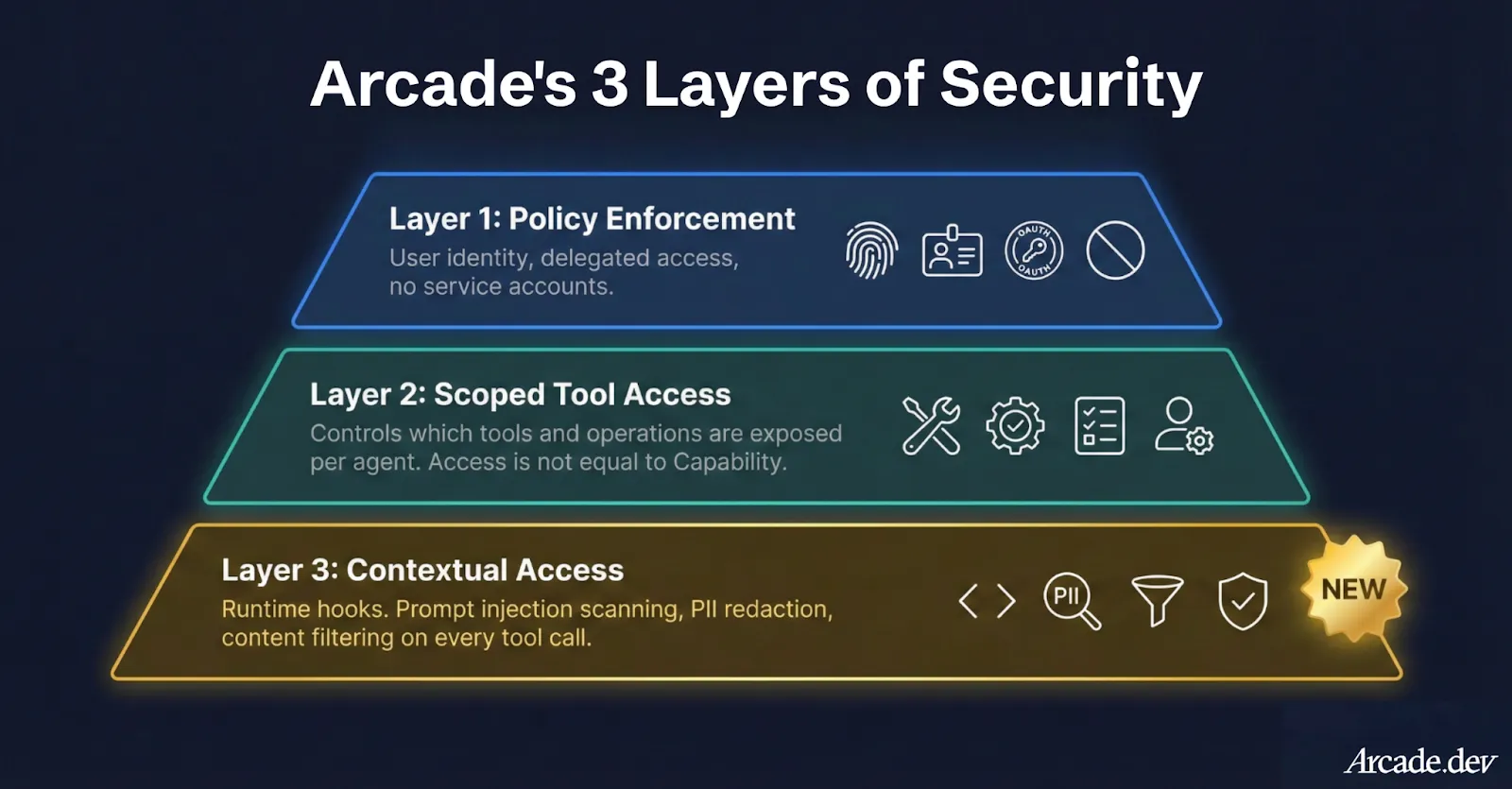
Layer 1: Policy Enforcement for AI Agents - Your Identity, Your Rules
When an AI agent executes a tool through Arcade, it doesn’t use a service account or mint a new API key. The agent acts on behalf of the user, using their existing identity, governed by the policies your IT team already manages: Entra ID, Okta, or whatever you run today.
If Jim in supply chain can access three SAP transaction codes, that’s exactly what an agent running on Jim’s behalf can do, not a byte more. And critically, user tokens never touch the LLM context. Arcade manages the full OAuth lifecycle in an isolated runtime, so the agent never sees a credential or secret.
Layer 2: Per Agent Scoped Tool Access - Access ≠ Capability
Layer 1 ensures an agent can’t exceed a user’s permissions. Layer 2 lets you further restrict what the agent is allowed to do within those permissions.
A user might have full Gmail access: read, send, delete. But should their agent have delete access? Your governance team building agents scope each agent’s toolkit to expose only the operations that make sense. We do this for our own internal agents: an EA at Arcade has full Gmail access to the CEO’s account as a user, but we removed the delete scope from her agent. A supply chain manager’s agent gets order tracking tools. A finance team’s agent gets reporting tools. Each agent sees only what’s relevant and can only do what’s been approved.
These two layers alone put Arcade well ahead of what other AI agent integration platforms and runtimes can offer natively. For most deployments, they handle the vast majority of enterprise security requirements. But “most” isn’t “all”.
Layer 3: Contextual Access - Sophisticated Policies at Runtime
Layers 1 and 2 answer who can do what. But some policies can’t be expressed through identity and tool scoping alone; a user’s agent might be scoped to send email, but nothing in Gmail’s OAuth model can restrict it to internal domains only.
Today, we’re launching Contextual Access, a system that lets you inject your own security, compliance, and filtering logic directly into Arcade’s tool execution pipeline. Three hook points let you intercept tool calls at the moments that matter: before the agent sees a tool, before a tool executes, and after a tool returns its result.
Practical Examples of Policies:
Prompt injection: An agent submits a SAP query with an embedded payload. With Contextual Access, the query never executes.
Poisoned tool outputs: A scraping tool returns content with hijack instructions. The payload is stripped before the LLM ever sees it.
PII in responses: A tool returns customer records with sensitive fields. They’re redacted before entering the model context.
Suspicious patterns: A sequence of calls looks like data exfiltration. The sequence is flagged and blocked in real time.
The Three Hook Points
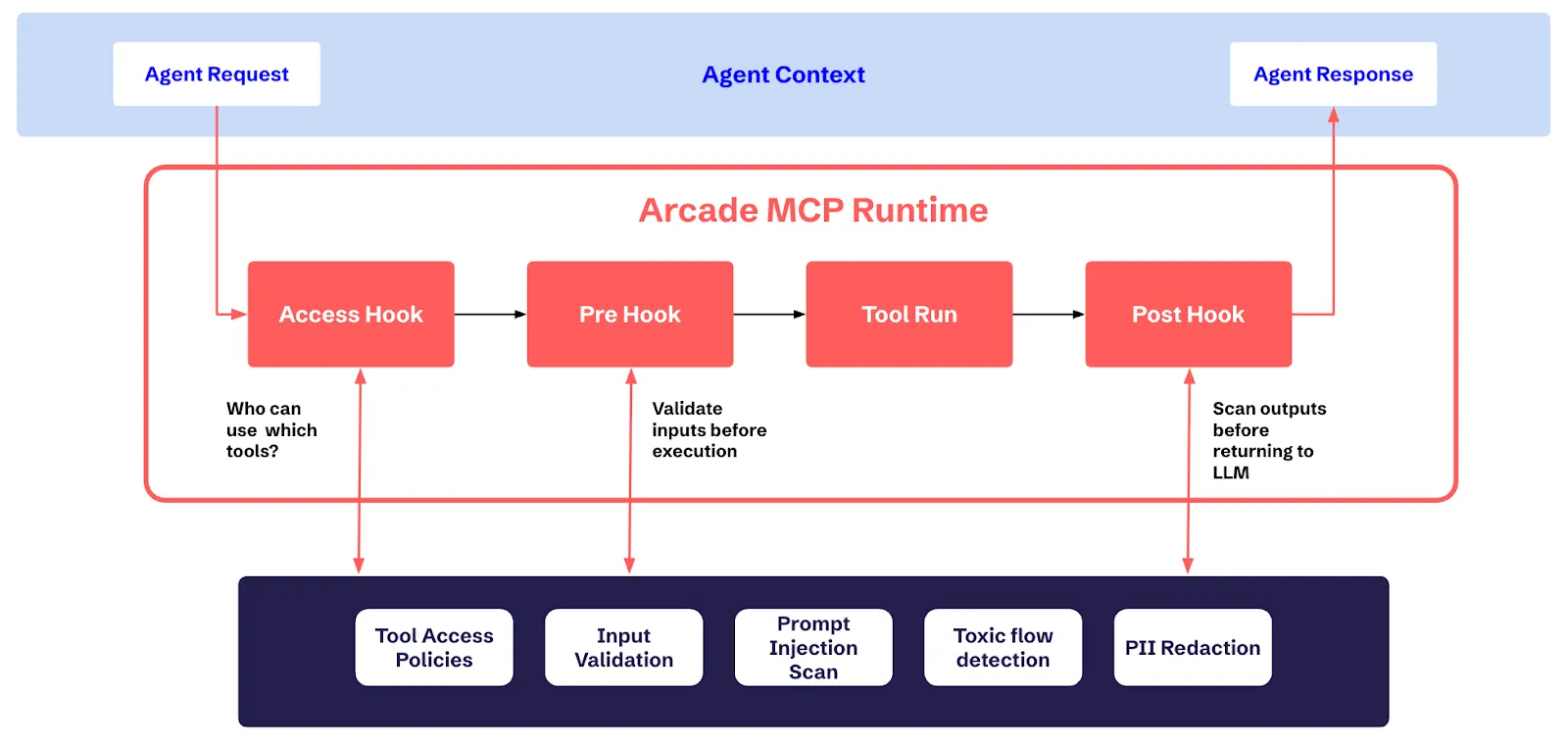
Contextual Access gives you three hook points in Arcade’s MCP runtime for both API and MCP server tool calls. Each one is an independent checkpoint where you inject your own logic via webhooks, and together they form a complete security pipeline around every tool call.
Access Hook: Control Tool Visibility
The Access hook is a hook in Arcade’s runtime that lets you control which tools an agent can discover. It fires when an agent requests the list of available tools before the agent even knows a tool exists.
Connect it to your entitlement engine, your custom RBAC logic, or any external system that makes access decisions. The agent requests available tools, Arcade calls your webhook, and your system returns the filtered list. An agent that can’t see a tool can’t call it, and an agent that can’t call a tool can’t be tricked into misusing it.
Batch support means a single webhook call can evaluate the entire tool catalog with no N+1 problem when listing hundreds of tools. Results are cached with configurable time-to-live (TTL) so you’re not adding latency to every chat turn. Cache invalidation happens automatically when hook configurations change, or you can trigger it manually via API.
When it runs:
- Tool listing: filters the catalog before the agent sees it
- Before execution: re-validates in case permissions have changed since the last cache
Pre-Execution Hook: Gate Every Tool Call
The Pre-Execution hook is a hook in Arcade’s runtime that lets you validate, transform, or block any tool call before it executes. This is where real-time policy enforcement happens. You can catch things that identity and scoping can’t.
What your hook receives:
- Tool identity (name, toolkit, version)
- All inputs the agent is passing to the tool
- User context (user ID, authorization info)
What your hook can do:
- Allow: proceed as-is
- Allow with modifications: override inputs, inject per-user parameters, map human-readable IDs to internal UUIDs, route to specific backends
- Deny: block execution with a reason that’s returned to the agent
A financial services customer enforces that email tools only send within the organization domain. A manufacturing customer validates that SAP transaction codes match the user’s plant assignment. A healthcare customer ensures patient record queries include required consent parameters.
If your Pre-Execution hook says no, the tool never fires and the downstream system never sees the request, keeping the blast radius as small as possible.
Post-Execution Hook: Control What Comes Back
The Post-Execution hook is a hook in Arcade’s runtime that lets you scan, redact, or block tool output before it reaches the LLM. This is your last line of defense before data enters the model context.
What your hook receives:
- Everything from the pre-execution context (tool identity, inputs, user context)
- Execution ID (correlates with the pre-execution hook for end-to-end tracing)
- Success/failure status
- The full output from the tool
What your hook can do:
- Allow: return the output as-is
- Allow with modifications: redact fields, transform data, strip sensitive content
- Deny: replace the output entirely with an error message; the agent never sees the original
This is where you handle PII redaction and catch the most dangerous prompt injection payloads. The ones embedded in data that tools return, not user prompts, and capture full execution context for compliance logging.
Contextual Access protects in both directions: it secures the tools from the agent, and it secures the agent from the tools.
Enforcing Complex Composable Security with Contextual Access
Multiple hooks on the same hook point execute as a pipeline, ordered by priority. Each hook sees the accumulated output of every hook before it. This lets you build sophisticated protections that get automatically enforced on every tool call without any single hook needing to know about the others.
Pre-Execution chain: Hook A enriches the input with additional parameters → Hook B validates those parameters → Hook C logs the final request.
Post-Execution chain: Hook A redacts PII from the output → Hook B scans the redacted output for prompt injection → Hook C never sees the original sensitive values.
Access chain: Hook A returns the subset of tools the user can access → Hook B only evaluates tools that passed Hook A.
The chain stops immediately when any hook denies subsequent hooks don’t execute, because a single rejection is enough to block the call.
How to Configure Contextual Access at the Org and Project Level
Contextual Access Hooks are configured at two levels, and both always execute:
- Organization-level - Company-wide policies applied to every project
- Project-level - Team-specific rules scoped to individual use cases
The execution flow follows a strict three-phase sequence:
Phase 1: Org hooks (before) Company-wide compliance first
Phase 2: Project hooks Team-specific validation and filtering
Phase 3: Org hooks (after) Org-wide PII redaction and audit
Modifications accumulate across all phases. If the org pre-hook injects a compliance parameter, the project pre-hook sees it. If the project post-hook redacts a field, the org post-hook sees the redacted version.
How to Control Failure Modes with Contextual Access
Every Contextual Access hook is configured with a failure mode for when the webhook is unreachable:
- fail_closed - Block the operation. For security-critical checks where “I don’t know” means “no.”
- fail_open - Allow the operation. For non-critical enhancements like metrics or logging.
You configure this per hook, because a PII scanner going down shouldn’t have the same blast radius as a telemetry collector.
Retry support is built in with configurable max attempts, exponential backoff, retry only on transient failures (5xx, timeouts, connection errors).
Test Contextual Access in Production Without Risk
Any Contextual Access hook can be set to dry-run mode so you can test it before it hits prod. In dry-run:
- Your webhook is called with real production requests
- But nothing is enforced tool execution proceeds as if the hook returned “allow”
This lets you validate new hook logic against live traffic before flipping it to enforcement. See exactly what would have been blocked, what would have been modified, what latency your webhook adds all without touching a single production workflow.
Webhooks: Bring Your Policies to AI Agents
We’re continuously expanding the ways you can enforce your organization’s security policies on AI agents. We started with webhooks because they give you the most flexibility your policies are yours, and no two enterprises enforce access control the same way.
A webhook lets you implement exactly your logic, in your language, on your infrastructure, today. The contract is clean and well-defined:
- Authentication: Bearer token or mTLS for zero-trust networks
- Health checks: Configurable intervals with healthy/degraded/unhealthy status visible in the dashboard
- Full OpenAPI 3.0 spec: Available on GitHub with complete request/response schemas for all three hook points
- Versioning: Every configuration change is versioned with rollback support
We started with webhooks, and we’ll continue to build direct integrations with security vendors like Snyk, identity and entitlement systems like Sailpoint and Okta, and more. They’ll plug into the exact same hook architecture, so your existing webhook configurations will work alongside native integrations as your stack evolves.
Get Started
Contextual Access is available today for all Arcade customers.
- Read the docs: Full API reference, webhook schemas, and configuration guides.
- Deploy a webhook: Start with a simple pass-through and iterate.
- Configure your hooks: Access, Pre-Execution, Post-Execution pick what matters first.
- Enable dry-run: Validate against live traffic before enforcing
- Chain and compose: Add hooks incrementally as your requirements evolve
We’re publishing sample webhook servers to get you started. The complete webhook API specification is available on GitHub →
Sign up for free and start building → arcade.dev