


Every developer has the same fantasy: wake up, get a voice briefing of everything that matters, and move on with your day. No inbox doom-scrolling, no tab-switching between GitHub and Slack and Gmail. Just a clean summary, delivered to your phone, in audio. Like Tony Stark — minus the suit budget.
I finally built it. It took 15 minutes, one new tool, and zero traditional code. Here’s how.
The Itch
When Anthropic announced Claude Routines — scheduled, recurring agent tasks — something clicked. I’ve been building tools at Arcade.dev for a while, and we already had connectors for Gmail, GitHub, Slack, and more. What if I just… wired them together into a personal briefing agent?
The idea was simple: every hour, an agent reads my email, checks my GitHub PRs, scans what matters, and sends me a short summary. No dashboards. No apps. Just a message on my phone.
Attempt One: Slack Notifications
First pass used our Slack tool to send me summaries. It worked — technically. But Slack is noisy. My briefing got buried between threads, emoji reactions, and someone asking if the office fridge is communal (it is, Gary).
Slack wasn’t the right channel for this. I needed something quieter. Something that felt more like an alert and less like another chat window.
Going Telegram
I switched to Telegram. Problem: we didn’t have a Telegram tool yet.
So I had Claude build one. I gave it a single prompt, pointed it at our existing project structure, and ten minutes later I had a working Telegram tool — send message, get messages, and text-to-speech via OpenAI’s TTS API all baked in. Claude already knew how our toolkits are structured, so it basically wrote itself.
With the Telegram tool live, my agent could now push summaries directly to a private Telegram chat — as voice messages. Clean, quiet, mine.
Wiring It All Together With an MCP Gateway
Here’s where Arcade.dev’s MCP Gateway made everything click. Instead of configuring each tool connection individually, I created a single gateway that federates all my tools — Gmail, GitHub, Slack, and my new custom Telegram tool — behind one URL.
The setup took about two minutes in the Arcade.dev dashboard. You create a gateway, give it a slug, pick which tools to include from the catalog, and optionally add LLM instructions that tell the model how to use your specific tool combination. I added instructions like “summarize new emails and open PRs, then send a voice briefing via Telegram.”
The gateway gives you a single endpoint:
https://api.arcade.dev/mcp/your-gateway-slugI added that URL as a connector in Claude, and that was it. Claude now had access to every tool in my gateway — authenticated, scoped, and ready to go. No juggling multiple server configs. No managing separate connections for each service. One URL, all my tools.
This is the part that makes the 15-minute build time possible. Without the gateway, I’d be wiring up individual MCP server connections for Gmail, GitHub, and Telegram separately. With it, adding a new tool to my Jarvis setup is just a checkbox in the dashboard.
Audio Briefings Hit Different
Text summaries would’ve been fine. But hearing them? Way better. Three to five sentences, max. The kind of thing you listen to while pouring coffee.
Since the Telegram tool already had OpenAI TTS built in, the agent generates a short summary, converts it to audio, and sends it as a voice message — all in one step.
The result: a 10-to-30-second audio clip, every hour, covering everything I need to know. Emails, PRs, action items. No screen required.
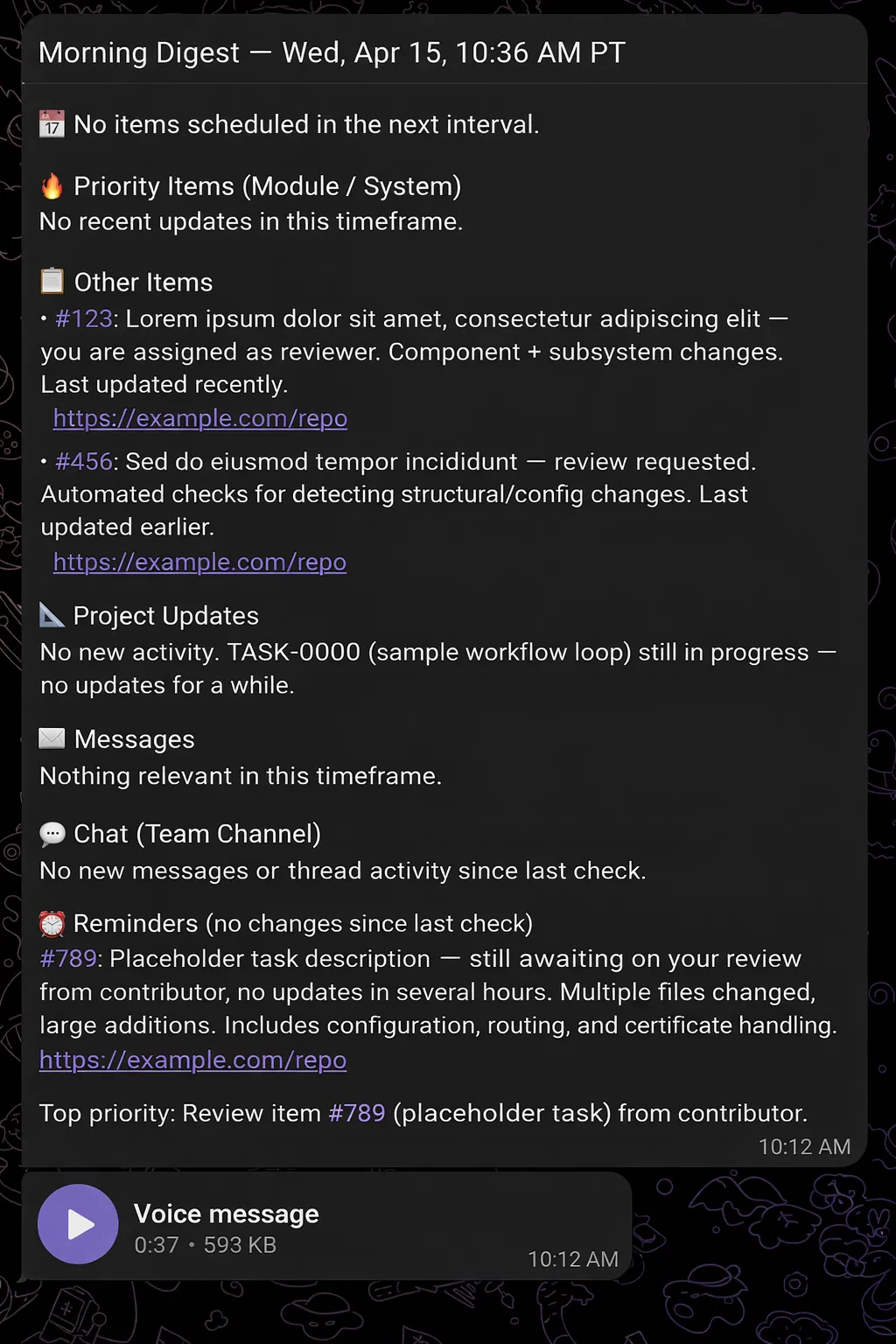
It worked on the first try. That’s when I knew this setup was ridiculous — in the best way.
The Duplicate Problem
One thing bugged me: the agent kept telling me about the same emails and PRs. Every hour it’d resurface stuff I’d already handled. Annoying.
The fix was dumb-simple. I created a small JSON file in a git repo — basically a key-value store tracking what’s already been reported. Every time the routine runs, Claude reads the file, compares it against new data, sends only the delta, and writes the updated state back.
No database. No Redis. No infrastructure. Just a JSON file and git commits. Ugly? Maybe. Works perfectly? Absolutely.
The Stack
Here’s what powers my personal Jarvis:
- Claude Routines — scheduled hourly agent runs
- Arcade.dev MCP Gateway — federates all tools behind a single URL, connected to Claude as one connector
- Arcade.dev Gmail tool — reads and filters my inbox
- Arcade.dev GitHub tool — pulls PR status and review requests
- Arcade.dev Telegram tool — delivers voice messages with built-in OpenAI TTS (built by Claude in ~10 minutes)
- A JSON file in git — state management for deduplication
No backend. No deployment pipeline. No frontend. The entire thing is prompt + tools.
Why This Matters
Look, I’m not going to pretend this is production infrastructure. It’s a personal hack. But that’s exactly the point.
A year ago, building something like this would’ve meant writing a Node service, managing OAuth tokens for Gmail and GitHub, deploying a cron job somewhere, handling Telegram’s bot API, integrating a TTS service, and figuring out state persistence. That’s a weekend project that turns into a week-long slog and then dies in a half-finished repo.
I did it in 15 minutes. The tools handle auth. Claude handles orchestration. I just described what I wanted and iterated on the prompt a few times until the output was right.
The gap between “I want an AI that does X” and “I have an AI that does X” is shrinking fast. Authenticated tool access is what closes it. Your agent can’t send a Telegram message or read your Gmail if it can’t authenticate as you. That’s the hard part — and it’s the part Arcade.dev handles so you don’t have to.
Build Your Own
If you want to try this yourself:
- Set up Claude Routines with a recurring schedule
- Pick your tools — Gmail, GitHub, Slack, Calendar, whatever matters to your workflow
- Create an MCP Gateway — federate your tools into a single endpoint via the Arcade.dev dashboard, add LLM instructions for your use case, and connect the gateway URL to Claude as a connector
- Add a notification channel — Telegram, Slack, email, whatever you actually check
- Iterate on the prompt — this is where the magic happens. Be specific about what you want summarized and how
- Solve for state — a JSON file in git works. So does a simple database tool. Keep it minimal
The whole thing took me 15 minutes. The Telegram tool was the only “code” involved, and Claude wrote that from a single prompt in ten minutes flat.
The Closest Thing to Jarvis — No Code Required
I’ve been chasing the personal AI assistant dream for years. Every attempt before this involved too much glue code, too many OAuth headaches, and too much maintenance.
This one just works. Every hour, my phone buzzes with a voice message. Fifteen seconds of audio that tells me exactly what’s happened since the last update. It’s not Jarvis. But it’s the closest I’ve gotten — and the whole thing took 15 minutes with zero application code.
That’s what happens when your tools can actually authenticate and act. The agent stops being a chatbot and starts being useful.
Want to build agents that actually do things? Check out Arcade.dev’s tool catalog and start connecting your agent to the real world.
FAQ
How do I build a personal Jarvis AI using Claude?
Build a personal Jarvis AI assistant using Claude Routines and the Arcade MCP Gateway. Arcade connects Claude to real-world tools like Gmail and Telegram and enforces per-user authorization and policy on every call. The agent reviews your daily tasks and sends summarized audio briefings.
Can Claude send voice messages to Telegram?
Yes. Claude can send voice messages to Telegram using a custom Arcade tool integrated with the OpenAI TTS API. The integration converts daily text summaries into audio files and pushes them to a private Telegram chat. You can build and deploy this Telegram connection using Arcade in a few minutes.
What is the Arcade MCP Gateway?
The Arcade MCP Gateway is a feature of the Arcade runtime that federates multiple AI integrations behind a single authenticated URL. Instead of configuring separate server connections for services like GitHub and Slack, developers route tool access through one endpoint. The runtime behind the Gateway enforces user-scoped authorization and policy.
How do I prevent an AI agent from summarizing duplicate emails?
Use a JSON file in a Git repository to track previously processed messages. Each time the Claude agent runs its scheduled routine, it compares current inbox data against the stored JSON state. The agent then summarizes only unread items and updates the file, which removes the need for a database.
How do I schedule recurring AI agent workflows?
Use the Claude Routines feature. Routines enable unattended agent tasks that run on hourly or daily schedules. Combined with Arcade toolkits, scheduled agents independently check notifications and send proactive updates.
Do I need backend code to connect Claude to Gmail and GitHub?
No. You don’t need to build a backend. Arcade handles OAuth, credential vaulting, and the API lifecycle for services like Gmail and GitHub. Developers write language prompts and authorize tools through the Arcade dashboard.