


TL;DR: Arcade.dev captures every administrative action across the runtime automatically — who did it, how, what changed, and when. There’s nothing to enable. Audit logs are on by default, with a filterable dashboard and a REST API for pulling data into your own systems.
When your team is running AI agents in production, many different people and systems are making changes to the runtime. API keys get rotated, gateway configurations get updated, new tools get added to projects, and permissions get adjusted. One question comes up every time: who changed what, and when?
Your security team will ask. A SOC 2 auditor will ask. And when a workflow breaks at 3 AM because something in the platform changed, you’ll be asking too.
If you can’t answer clearly, your AI project stalls in staging. We’ve seen teams build something genuinely impressive, get everyone excited, and then watch the compliance review kill momentum because there’s no trail.
Audit logs on Arcade answer that question before it becomes a blocker. Here’s what they capture and how to use them.
What are audit logs for AI agent runtimes?
Audit logs are an automatic, immutable record of every administrative action taken on the infrastructure your AI agents run on. On Arcade, every time someone creates a project, rotates an API key, configures a gateway, or modifies a deployment, that action is captured with full attribution — who did it, how, what changed, and when.
Audit logging is on by default for every Arcade account. Every log entry tells you exactly what happened in plain language: who did it, how they did it, what they changed, and when it happened.
Here’s what that looks like in practice:
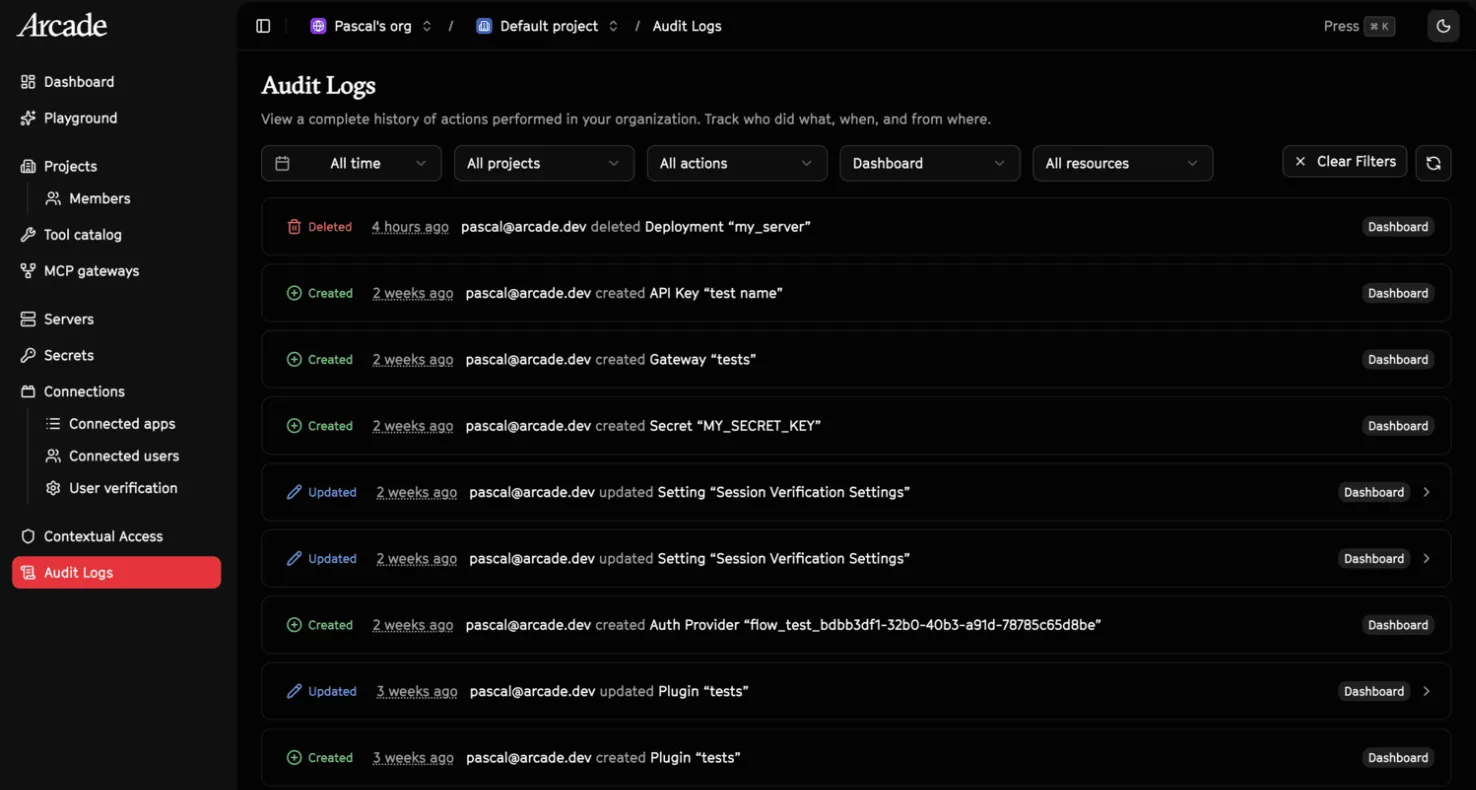
2 weeks ago
pascal@arcade.devcreated Gateway “arcade”
You know who created it, how they authenticated, which gateway it was, and exactly when it happened.
For updates, you don’t just see that something changed — you see a diff of exactly what was modified. No guessing whether it was the name, the config, or the permissions; you get the before and after.
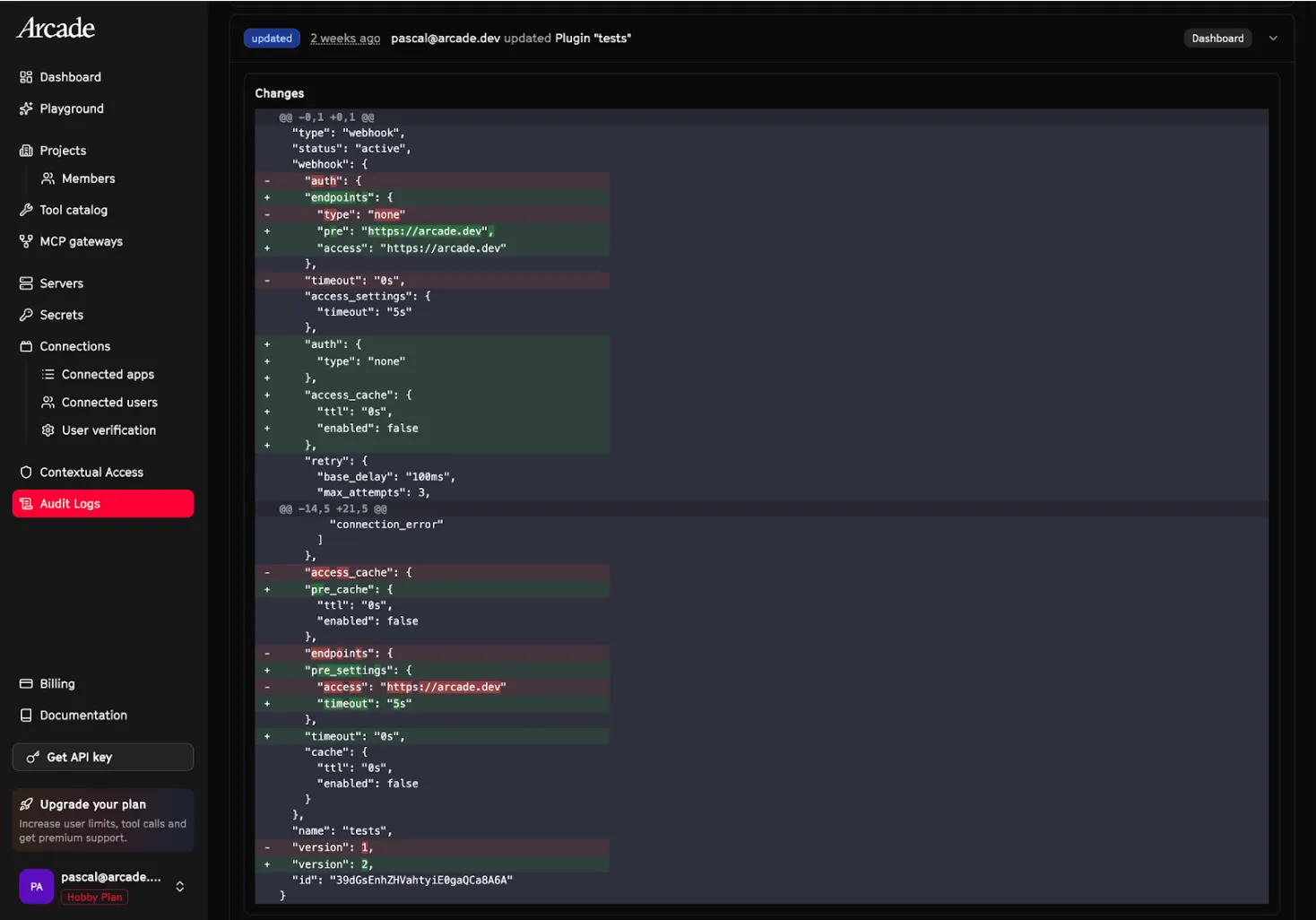
That means you get the full picture without stitching together multiple log sources to reconstruct what happened.
How do you track changes across AI agent projects?
The audit log dashboard gives you an org-wide view of every change happening across your projects. It’s presented as a clean, filterable table where you can narrow by user, resource type, or action to find exactly what you’re looking for. Need to check what changed on a specific project? Filter by project. Want to see every API key rotation across your org? It’s two clicks.
Here’s how it works under the hood:
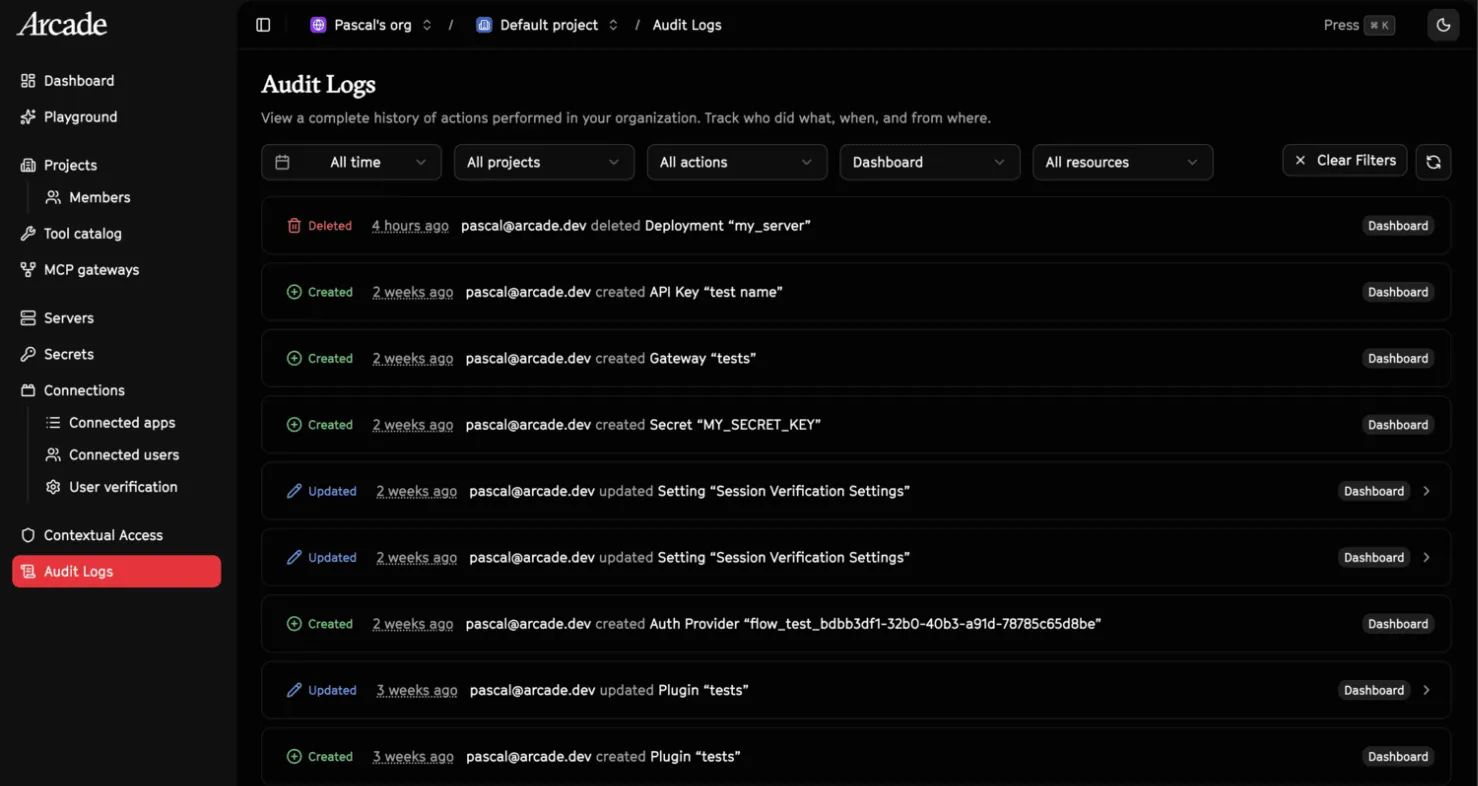
Every action is captured by default. There’s nothing to configure and nothing to miss — if it happens on the runtime, it’s in the log. Display names and resource details are snapshotted at the time of the action, so if someone deletes a project, the log still shows what it was called. If a team member leaves and their account is removed, their actions are still attributed and the trail doesn’t break.
The logging layer adds virtually zero overhead. Logs are org-wide but filterable by project, so team members see the audit trail for projects they belong to without the noise of everything else. Future releases will allow you to further limit who has access to the audit logs.
Audit logs are currently retained for 30 days. If your compliance requirements call for a longer retention window, contact us.
Can I pull agent platform audit data into my own systems?
If you want audit events outside the dashboard, there’s a REST API. You can pull logs programmatically to feed into your existing SIEM, compliance tooling, or internal reporting.
Fetch the 10 most recent audit logs for your organization, filtered to creation events:
curl -s "https://api.arcade.dev/api/v1/orgs/{org_id}/audit_logs?action=AUDIT_ACTION_CREATED&limit=10" \
  -H "Authorization: Bearer $ARCADE_API_KEY"
{
"code": 200,
"msg": "Request successful",
"data": {
"items": [
{
"id": "d290f1ee-6c54-4b01-90e6-d701748f0851",
"event_id": "a1b2c3d4-e5f6-7890-abcd-ef1234567890",
"timestamp": "2026-02-24T12:34:56.789Z",
"action": "AUDIT_ACTION_CREATED",
"source": "AUDIT_SOURCE_API",
"display_name": "pascal@arcade.dev",
"organization_id": "550e8400-e29b-41d4-a716-446655440000",
"principal_type": "ACCOUNT",
"resource_type": "RESOURCE_TYPE_API_KEY",
"resource_display": "prod-key-1"
}
],
"next_cursor": "MjAyNi0wMi0yNFQxMjo...",
"has_more": true
}
}See the docs for the full API reference, filtering options, and pagination.
Why do AI agent runtimes need audit logs?
Production deployments don’t get approved without a clear audit trail. Your security team needs to see who changed what and when, and “check the Slack history” isn’t an answer they’ll accept.
Think about what happens without them: an AI agent misconfigures something in production, a teammate accidentally deletes a gateway, or an API key gets rotated and suddenly a workflow breaks. Without audit logs, you’re digging through Slack threads and asking “did anyone touch this?” With them, you have the answer in seconds.
If you’re going through SOC 2, ISO 27001, or any compliance framework that requires change management evidence, this gives you a clean, automated record without anyone having to manually document what happened. They answer the questions that actually block production rollouts: can we prove who authorized this action, can we trace what happened and when, and can we hand our compliance team a clean record and move on?
Get started
Audit logs are one piece of the trust layer that enables agents to go from demo to production, and a foundational part of the Arcade runtime. Audit logging is live for every Arcade account.
- Open your dashboard to see the audit log table across your org
- Use the filters to narrow by project, user, resource type, or action
- Pull data via the REST API if you want audit events in your own systems
- Read the docs for the full API reference
Not on Arcade yet? Sign up for free and start building.
FAQ
What actions are logged?
All administrative actions on the Arcade runtime: creating, updating, and deleting projects, API keys, gateways, deployments, and other resources. Audit logs do not currently cover individual tool executions — these will be added in a future release.
Do I need to enable anything?
No. It’s on by default.
How long are logs retained?
30 days. Contact us if you need longer.
Can I export audit log data?
Yes. There’s a REST API for pulling audit events into your own SIEM, compliance tooling, or reporting systems. See the docs for the full API reference.
Who can see audit logs?
Every team member can see the audit trail for projects they belong to. Logs are org-wide but filterable by project. We will be adding further access controls in the future.
Does this help with SOC 2 / ISO 27001?
Yes. Automated change management evidence with full attribution.