


Most conversations about AI agents still start the same way: models, prompts, frameworks, followed by an incredible looking demo. Then someone asks, “Okay… when can it ship to production?”
That’s where things get a little awkward.
The naked truth in the fading demo afterglow is that agents are apps. Which means they need identity, permissions, real integrations, and a way to behave predictably when something goes sideways.
Without these components, any agent can dazzle a boardroom, but it won’t survive app sec reviews or security audits.
That’s the vibe this year. Not “how fast can we hack something together,” but “what’s the scoped, real workflow that can actually run in production.”
If this is the year you want agents to start being useful, these are some of the most common production agents Arcade.dev users are running today. They’re built for real systems, real workflows, and real gains.
The payoff? Tasks that used to eat hours now finish in minutes.

💪 Before we get into the agent workflows, a quick warm-up.
If you haven’t watched 7 Minute Apps yet, start here.
No gym required. Neon encouraged.
Already watched the video? The sections below break down each workflow in more detail — and why these are the kinds of agents that keep paying off over time.
Build an agent for incident analysis
Because the first 30 minutes of an incident shouldn’t be chaos
When an incident fires, most teams fall into the same routine. PagerDuty in one tab. Datadog in another. Digging through logs and traces across different systems. Slack filling up with partial theories while everyone tries to reconstruct what changed.
The Debug Investigation Agent turns that scramble into a repeatable warm-up. When an incident triggers, it pulls context from PagerDuty, gathers logs and metrics from Datadog, correlates related events and errors, and posts a structured investigation summary to Slack. As the situation evolves, it records notes directly on the incident and can help schedule a post-incident review once things settle down.
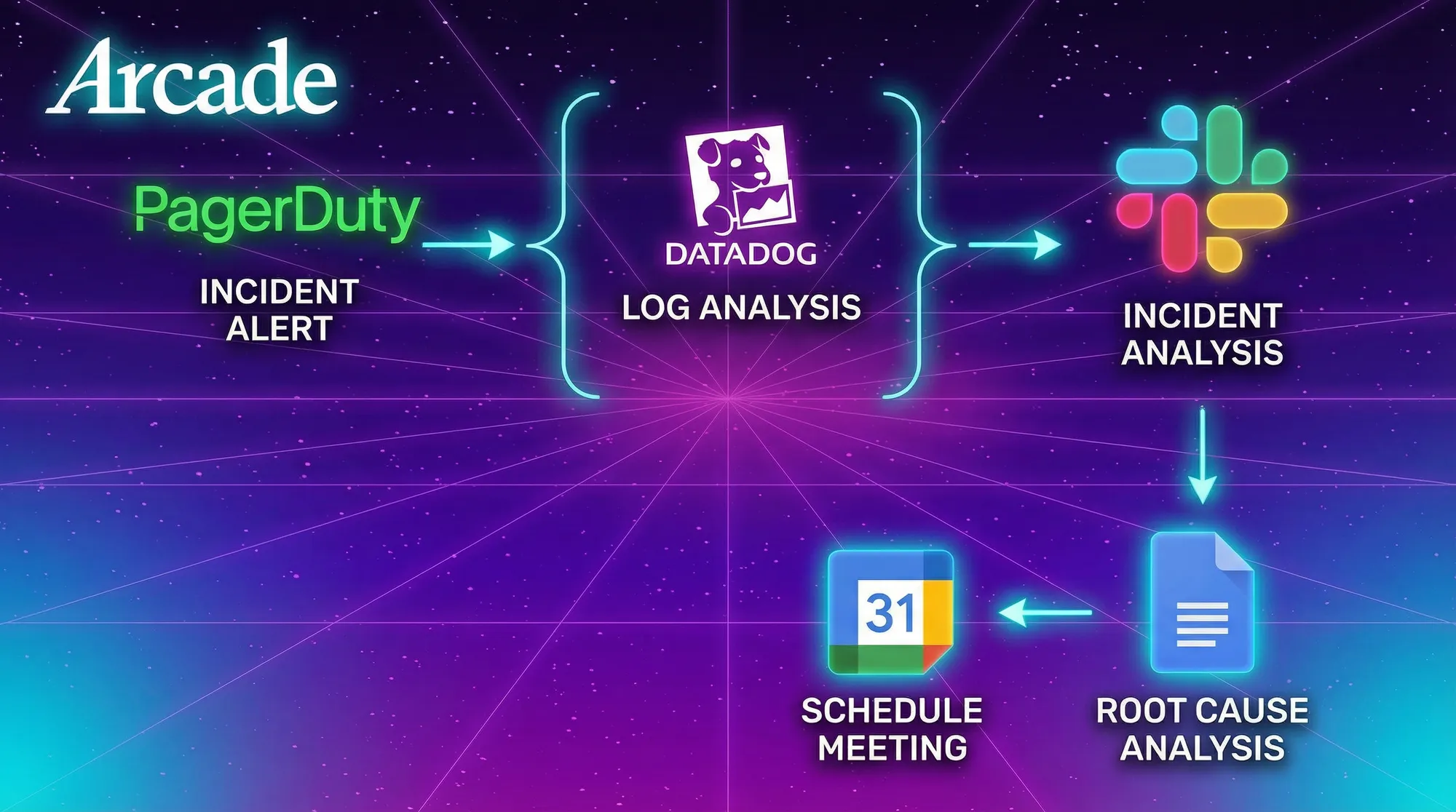
Nothing runs on autopilot. Updates to incident status, messages, and emails all require human confirmation. The agent isn’t there to replace judgment — it’s there to make sure the same basic reps happen quickly, without wasted motion.
Build an agent to tell you what eng projects are actually on track
Because status updates shouldn’t be a weekly workout
Every team has this problem. Work is moving in GitHub and Linear, but it’s fragmented across projects and people. By the end of the week, it’s hard to answer simple questions: what actually shipped, what’s on track, and where attention is needed.
The Weekly Developer Digest Agent takes over those reps. On a schedule, it looks across GitHub, Linear, and related tools, assembles a concise snapshot of what actually moved during the week, and writes the digest to a shared Google Doc. When it’s ready, the update gets posted to Teams or Slack.
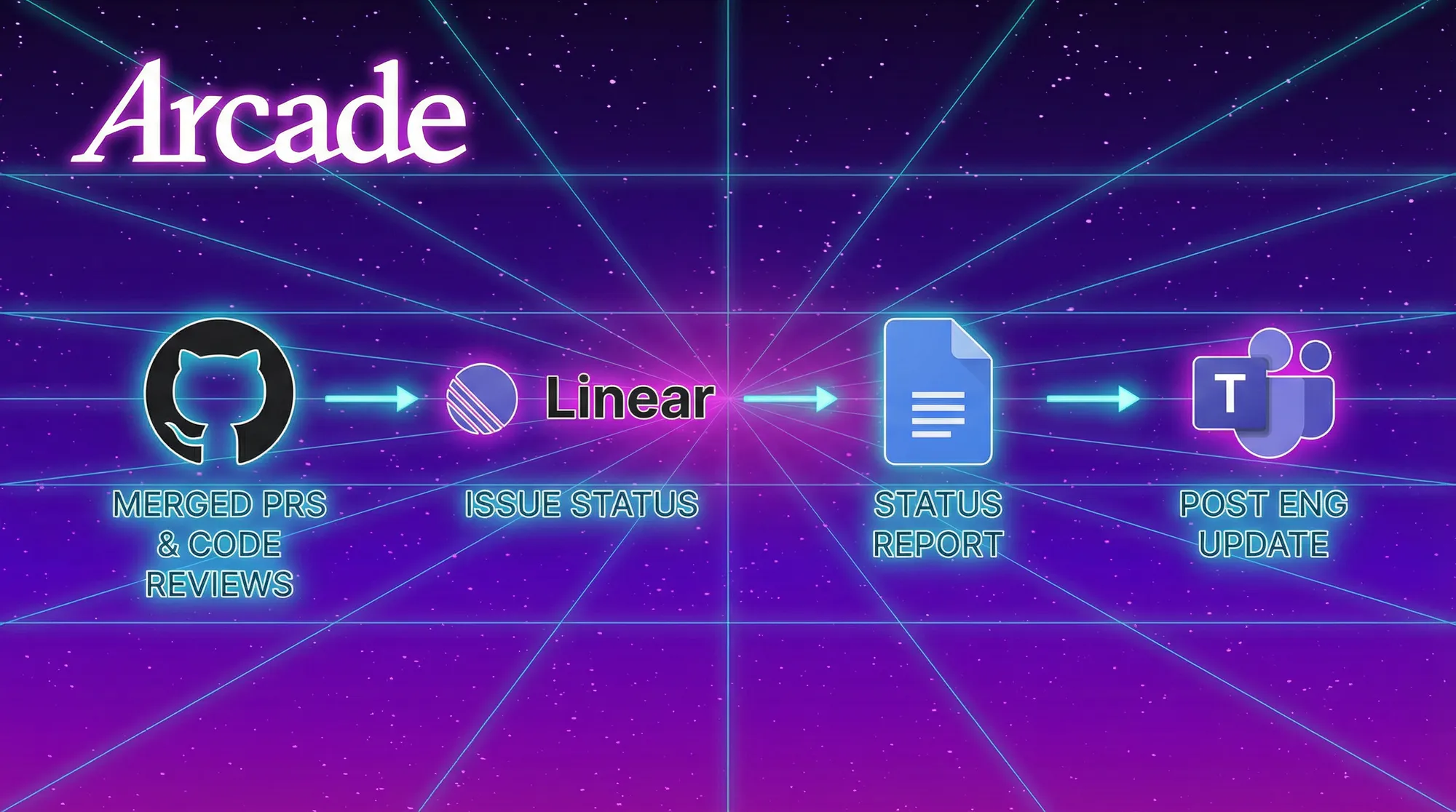
There’s nothing flashy about the output. What matters is the consistency. The same inputs, the same motion, the same result — without someone having to remember to do it every Friday afternoon.
This is the kind of agent teams keep running because it quietly builds momentum over time. Fewer interruptions. Fewer “quick syncs.” One less recurring task draining energy.
→ Weekly Developer Digest Agent
Build an agent that goes from ticket to feature update
Because shipping small changes shouldn’t break your rhythm
Even small changes tend to involve a lot of coordination. A ticket gets created. A branch gets spun up. Design context lives somewhere else. Code is updated, committed, and then reflected back into the tracking system.
Each step is straightforward. The constant switching is what breaks focus.
The Feature Implementation Agent smooths that flow. Working across tools like GitHub, Linear, and Slack, it helps move a change forward step by step — asking for direction where needed, executing against real systems, and keeping everything visible along the way.
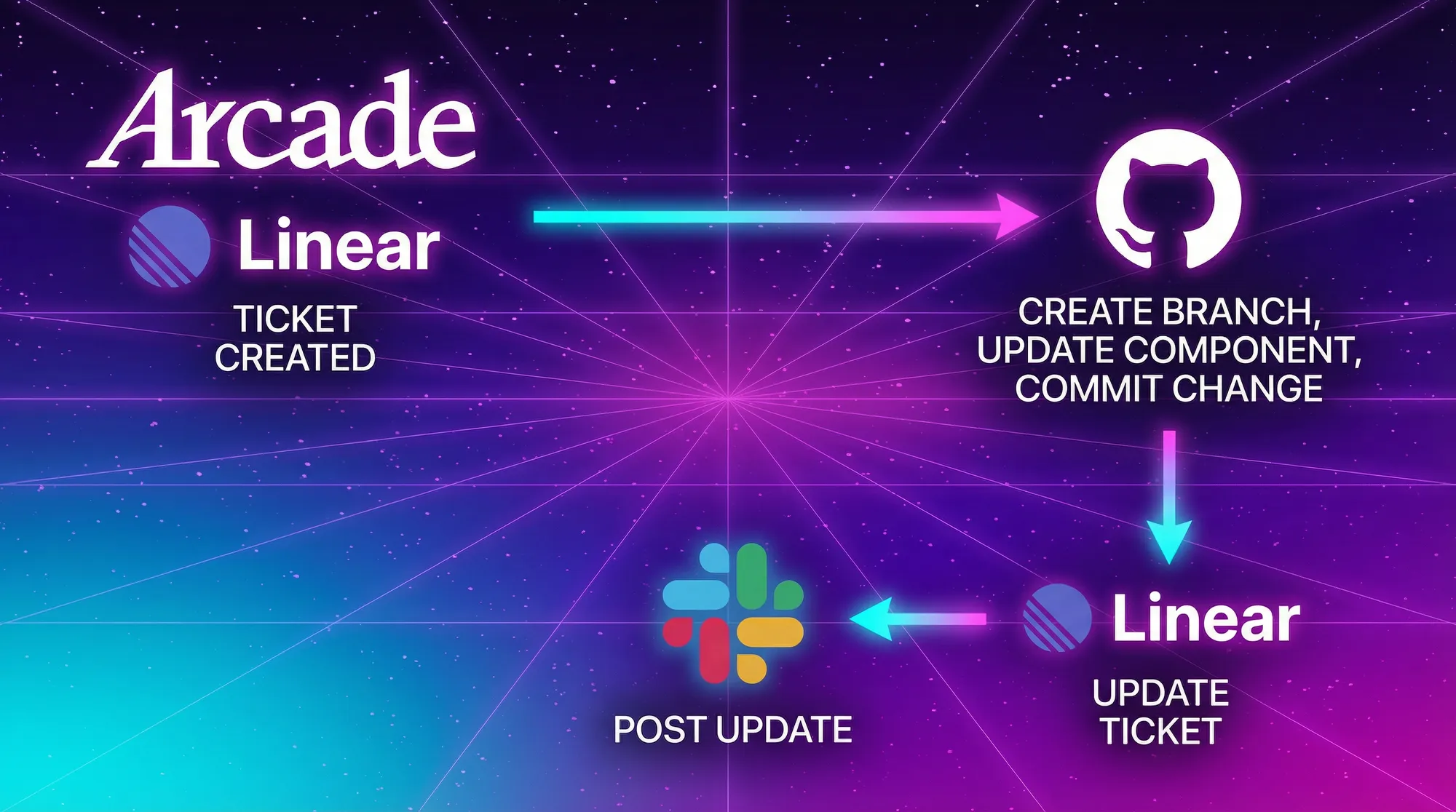
This isn’t about having an agent “build features for you.” It’s about removing the friction around the work so you can stay in rhythm. When the coordination becomes predictable, it stops demanding attention.
Built once, this kind of agent pays off the same way good habits do: small improvements, repeated consistently, that add up over time.
→ Feature Implementation Agent
Why this works
The fastest way to get value from agents is to stop overcomplicating them.
The point isn’t building faster once. It’s collapsing hours of recurring work into minutes every time the workflow runs.
With Arcade, teams don’t spend months rebuilding authorization, wiring integrations, or managing MCP sprawl just to automate the same tasks over and over. They focus on the workflow, put it in place, and let it compound value over time.
Build it once.
Ship it and rip it.
Get the time back all year.

What to build next
Each of the workflows above replaces repeated manual work — the kind that quietly consumes hours over the course of a year.
All three are fully documented and ready to run. Fork them, adapt them, or use them as patterns for your own agents.
If you want to see what these workflows actually look like when they’re running, wired up to real tools with real auth, join our weekly live demo.
Live every Tuesday at 1:30pm PT.
→ Join the weekly live demo
FAQ
Why is it difficult to deploy AI agents in production?
Deploying AI agents to production requires user identity, enforced permissions, real tool integrations, and a complete audit trail. Without these controls, an AI agent cannot pass application security reviews or enterprise audits. An MCP runtime, like Arcade, handles authorization, policy enforcement, and audit, so engineering teams can focus on the workflow.
How can AI agents help with software incident management?
AI agents automate the initial investigation phases of an incident by gathering context across monitoring tools like Datadog and alerting systems like PagerDuty. By acting as a workflow-specific Slack AI agent, the bot correlates related errors and posts a structured summary to Slack, giving the engineering team a head start. Final updates and external communications still require human confirmation.
What does the Weekly Developer Digest Agent do?
The Weekly Developer Digest Agent tracks engineering project progress across task management and version control systems. It scans GitHub and Linear on a schedule to summarize shipped features and open pull requests. It then writes the status report to a Google Doc and shares it in Slack or Microsoft Teams.
Can AI agents automate feature implementation from tracking tickets?
Yes. A Feature Implementation Agent pulls design context from Linear or Jira, coordinates with the codebase in GitHub, and keeps the team updated in Slack. This removes the context switching developers face when shipping small updates.
What is Arcade used for in AI development?
Arcade is an MCP runtime for deploying AI agents into enterprise production. It handles user-scoped authorization, policy enforcement, the OAuth lifecycle, and audit, so engineering teams don’t have to build that layer themselves. Teams use Arcade to ship workflows on day one, such as incident analysis bots and automated project digests.
How do you prevent AI agents from making unauthorized changes?
You scope agents to specific workflows and require human confirmation for critical actions. In an MCP runtime like Arcade, agents execute predictable tasks under the policies your organization has already defined in its IDP, sales, and security systems, and every action is logged for audit.